Snake Growth
Allowing our snake to eat apples, and grow longer each time it does
In this part, we'll implement apple consumption mechanics, handle snake growth, and create a dynamic apple spawning system.
By the end of this section, our snake will be able to move around the grid eating apples, and getting longer for every apple it consumes.
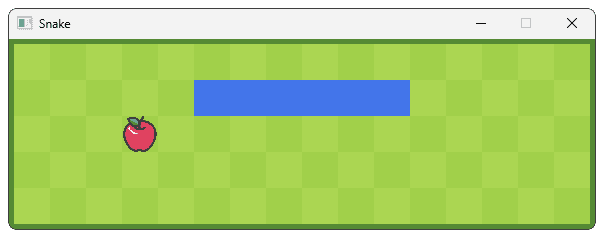
Starting Point
We'll continue from where we left off in the previous lesson. Our project already has a grid of interactive cells, and a snake that can be controlled with the arrow keys. The starting code for the most relevant files is provided below.
Files
Adding APPLE_EATEN Events
When our snake consumes an apple, we need to trigger a series of game events:
- Growing the snake
- Spawning a new apple somewhere in the grid
- Updating the score (in a future lesson)
We'll use SDL's event system to coordinate these actions. First, let's define a new user event type in our Globals.h file. We covered this topic in our lesson on .
src/Globals.h
#pragma once
#define CHECK_ERRORS
#include <iostream>
#include <SDL3/SDL.h>
#include <string>
namespace UserEvents{
inline const Uint32 ADVANCE{SDL_RegisterEvents(1)};
inline const Uint32 APPLE_EATEN{
SDL_RegisterEvents(1)};
}
// ...Now we'll modify our Cell class to dispatch this event when the snake moves into a cell containing an apple. The Advance() function already detects snake movement, so we'll add a few additional lines of code to handle apple consumption:
src/Snake/Cell.cpp
// ...
void Cell::Advance(const SDL_UserEvent& E) {
SnakeData* Data{static_cast<SnakeData*>(E.data1)};
bool isThisCell{
Data->HeadRow == Row &&
Data->HeadCol == Column
};
if (isThisCell) {
if (State == CellState::Apple) {
SDL_Event Event{ .type = UserEvents::APPLE_EATEN };
SDL_PushEvent(&Event);
}
State = CellState::Snake;
SnakeDuration = Data->Length;
} else if (State == CellState::Snake) {
--SnakeDuration;
if (SnakeDuration == 0) {
State = CellState::Empty;
}
}
}This approach keeps our code modular - the cell only needs to announce that an apple was eaten, and other components can react accordingly.
Reacting to APPLE_EATEN Events
Next, we need to update our classes to react to these events. Every time an apple is eaten, our snake needs to get longer. Our snake's length is stored in the Snake variable of our GameState object. Let's update HandleEvent() in GameState.h to increment the snake's length every time an apple is eaten:
src/GameState.h
#pragma once
#include <SDL3/SDL.h>
#include "Globals.h"
#include "Snake/SnakeData.h"
class GameState {
public:
void HandleEvent(const SDL_Event& E) {
if (E.type == SDL_EVENT_KEY_DOWN) {
HandleKeyEvent(E.key);
} else if (E.type == UserEvents::APPLE_EATEN) {
++Snake.Length;
}
}
// ...
};Additionally, individual snake segments are managed by any Cell object that has a State of CellState::Snake. When an apple is eaten, we need to increment the SnakeDuration of these cells, meaning the cell will remain a snake segment for one additional turn.
Let's update our HandleEvent() function in Cell.cpp to take care of this:
src/Snake/Cell.cpp
#include "Snake/Cell.h"
// ...
void Cell::HandleEvent(const SDL_Event& E) {
if (E.type == UserEvents::ADVANCE) {
Advance(E.user);
} else if (E.type == UserEvents::APPLE_EATEN) {
if (State == CellState::Snake) {
++SnakeDuration;
}
}
}
// ...Replacing Apples
Every time an apple is eaten, we need to place a new apple in a random, empty grid cell. Collectively, our Cell objects are managed by the Grid object, so the Grid class is the natural place to manage this.
First, however, let's add a PlaceApple() public method to our Cell class. If the Cell has a State of CellState::Empty, this method will update it to an Apple cell and return true, indicating the apple was successfully placed.
If the Cell is not empty, the PlaceApple() method will do nothing except return false, indicating the action failed.
src/Snake/Cell.h
#pragma once
#include <SDL3/SDL.h>
#include "Globals.h"
#include "Assets.h"
#include "Snake/SnakeData.h"
class Cell {
public:
// ...
bool PlaceApple();
private:
// ...
};src/Snake/Cell.cpp
// ...
bool Cell::PlaceApple() {
if (State != CellState::Empty) return false;
State = CellState::Apple;
return true;
}Over in Grid.h, we'll now implement the logic to place an apple in a random cell within the std::vector array called Cells. To access a random cell in this array, we'll generate a random index.
Remember, array indices start at 0 so, if our array contained 10 cells, their indices would range from 0 to 9. More generally, we want a random index from 0 to Cells.size() - 1.
The Random::Int() function we added to Engine/Random.h can help us choose an integer between two values. Arrays use the size_t type for their sizes and indices, which we can freely convert to and from a basic int:
src/Snake/Grid.h
#pragma once
#include <SDL3/SDL.h>
#include <vector>
#include "Snake/Cell.h"
#include "Globals.h"
#include "Engine/Random.h"
class Grid {
// ...
private:
void PlaceRandomApple() {
int RandomIndex{
Engine::Random::Int(0, int(Cells.size()) - 1)
};
// ...
}
std::vector<Cell> Cells;
};We need to continuously call the PlaceApple() method on random cells until we find one that is empty - that is, until PlaceApple() returns true. We can implement this as a loop that will break once Cells[RandomIndex].PlaceApple() succeeds:
src/Snake/Grid.h
#pragma once
#include <SDL3/SDL.h>
#include <vector>
#include "Snake/Cell.h"
#include "Globals.h"
#include "Engine/Random.h"
class Grid {
// ...
private:
void PlaceRandomApple() {
while (true) {
int RandomIndex{
Engine::Random::Int(0, int(Cells.size()) - 1)
};
if (Cells[RandomIndex].PlaceApple()) {
break;
}
}
}
std::vector<Cell> Cells;
};Finally, we need to call this PlaceRandomApple() function at the appropriate time. Our Grid class already has a HandleEvent() method, so we can invoke PlaceRandomApple() every time a UserEvents::APPLE_EATEN event is detected:
src/Snake/Grid.h
#pragma once
#include <vector>
#include "Snake/Cell.h"
#include "Globals.h"
#include "Engine/Random.h"
class Grid {
public:
// ...
void HandleEvent(const SDL_Event& E) {
for (auto& Cell : Cells) {
Cell.HandleEvent(E);
}
if (E.type == UserEvents::APPLE_EATEN) {
PlaceRandomApple();
}
}
// ...
};With these changes, our snake can now move around the world and eat apples. Every time an apple is eaten, a new one spawns elsewhere in the grid, and our snake gets one segment larger.
Complete Code
Complete versions of the files we changed in this part are available below
Files
Files not listed above have not been changed since the previous section.
Summary
In this lesson, we implemented more of the core gameplay mechanics for our Snake game. We added the following:
- A custom event type for apple consumption
- Reactions to this event type to handle snake growth
- A system for randomly placing new apples
Pausing and Restarting
Giving our Snake game the ability to pause itself, and adding a clickable button for restarting the game