Creating a Collision Component
Enable entities to detect collisions using bounding boxes managed by a dedicated component.
Our entities can now move realistically thanks to the PhysicsComponent, but they pass right through each other! This lesson introduces the CollisionComponent, responsible for defining an entity's physical shape for interaction. You'll learn how to:
- Create a
CollisionComponentwith offset, width, and height. - Calculate the component's bounding box each frame.
- Implement basic collision detection between entities.
- Integrate the
CollisionComponentwith theEntityandTransformComponent. - Visualize collision bounds for debugging.
By the end, your entities will be able to detect when they overlap, setting the stage for collision response in the next lesson.
Starting Point
This lesson builds on concepts we covered in the previous chapter - reviewing those lessons is recommended if you're not already familiar with and in SDL.
So far in our entity-component system, entities have TransformComponent for position/scale, PhysicsComponent for movement, ImageComponent for rendering, and InputComponent for control.
However, they lack any sense of physical presence beyond their single point position managed by their TransformComponent. We'll address that by continuing working from where we left off in the previous lesson and adding a CollisionComponent.
Our CollisionComponent will inherit from Component, and work closely with the entity's TransformComponent. For reference, our Component.h and TransformComponent.h are provided below:
Files
Bounding Box Review
In an earlier lesson, we introduced bounding boxes as simple shapes (usually rectangles or cuboids) used to approximate the physical space an object occupies.
We used Axis-Aligned Bounding Boxes (AABBs) - rectangles whose sides are parallel to the coordinate axes. These are simpler to work with than rotated boxes.
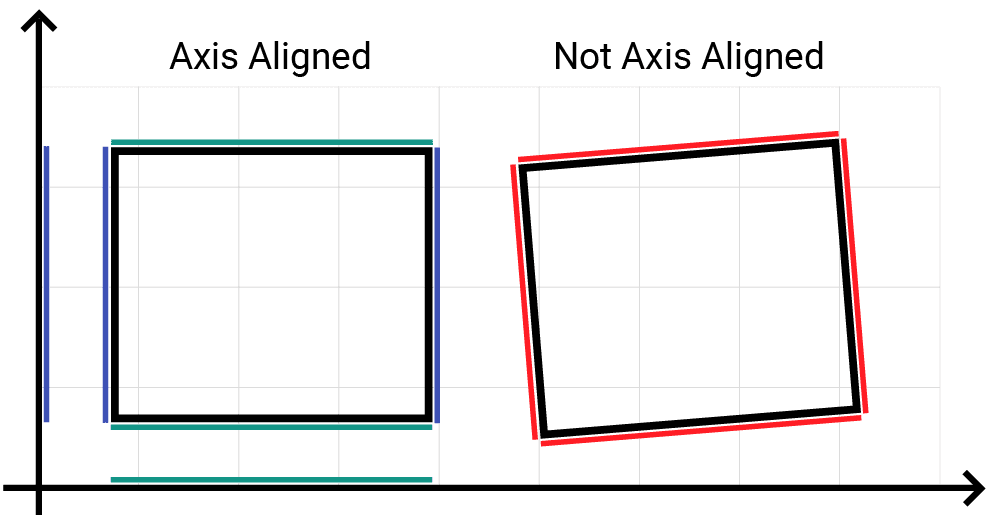
We represented them using SDL_Rect (for integer coordinates) and SDL_FRect (for floating-point coordinates).
We also created a BoundingBox class back then. Now, we'll create a CollisionComponent that encapsulates similar ideas but integrates with our entity-component system.
Creating the CollisionComponent
Let's define CollisionComponent.h. It will inherit from Component and manage the shape of the entity for collision purposes.
Crucially, this component will not store the entity's position directly. That's the job of the TransformComponent. Instead, the CollisionComponent defines its shape relative to the entity's origin (the TransformComponent's position).
Let's start by giving it some member variables, alongside getters and setters. We'll give it:
Offset: AVec2representing the top-left corner's offset from the entity's origin.Width,Height: Floating-point values defining the size of the collision box.Bounds: AnSDL_FRectthat will store the calculated bounding box each frame. This is the rectangle we'll use for intersection tests.
src/CollisionComponent.h
#pragma once
#include "Component.h"
#include "Vec2.h"
#include <SDL3/SDL.h>
class CollisionComponent : public Component {
public:
// Inherit constructor
using Component::Component;
// Setters for defining the collision shape
void SetOffset(const Vec2& NewOffset);
void SetSize(float NewWidth, float NewHeight);
// Getter for the calculated bounds
const SDL_FRect& GetBounds() const;
private:
// Shape definition relative to owner's origin
Vec2 Offset{0.0, 0.0};
float Width{1.0}; // Default 1x1
float Height{1.0};
// Calculated bounds updated each tick
SDL_FRect Bounds{0.0, 0.0, 0.0, 0.0};
};Now, let's implement the basic setters and the getter in CollisionComponent.cpp:
src/CollisionComponent.cpp
#include <iostream>
#include <cmath>
#include "CollisionComponent.h"
void CollisionComponent::SetOffset(
const Vec2& NewOffset
) {
Offset = NewOffset;
// Bounds will be recalculated in Tick()
}
void CollisionComponent::SetSize(
float NewWidth, float NewHeight
) {
if (NewWidth < 0 || NewHeight < 0) {
std::cerr << "Warning: CollisionComponent "
"width/height cannot be negative. "
"Using absolute values.\n";
Width = std::abs(NewWidth);
Height = std::abs(NewHeight);
} else {
Width = NewWidth;
Height = NewHeight;
}
// Bounds will be recalculated in Tick()
}
const SDL_FRect& CollisionComponent::GetBounds() const {
return Bounds;
}Updating Bounds - Tick()
The CollisionComponent needs to recalculate its Bounds rectangle every frame, as the owning entity might have moved. We'll do this in the Tick() method.
src/CollisionComponent.h
// ...
class CollisionComponent : public Component {
public:
// ...
// Called each frame to update Bounds
void Tick(float DeltaTime) override; // <h>
// ...
};Tick() needs to:
- Get the owner entity's current position -
GetOwnerPosition()- and scale -GetOwnerScale(). - Calculate the top-left corner of the bounds:
OwnerPosition + Offset. - Calculate the scaled width and height:
Width * OwnerScale,Height * OwnerScale. - Store these values in the
Boundsmember.
src/CollisionComponent.cpp
// ...
void CollisionComponent::Tick(float DeltaTime) {
Vec2 OwnerPos{GetOwnerPosition()};
float OwnerScale{GetOwnerScale()};
// Calculate position and dimensions
Bounds.x = OwnerPos.x + Offset.x;
Bounds.y = OwnerPos.y + Offset.y;
Bounds.w = Width * OwnerScale;
Bounds.h = Height * OwnerScale;
}
// ...Dependency Check - Initialize()
The CollisionComponent needs a TransformComponent to know the entity's position and scale. Let's enforce this in Initialize():
Files
Integrating with Entity
We'll add the standard AddCollisionComponent() and GetCollisionComponent() methods to Entity.h.
For simplicity in this lesson, we'll assume only one CollisionComponent per entity. If multiple shapes are needed, a more advanced design might involve a GetCollisionComponents() function that returns a std::vector, similar to GetImageComponents().
Let's update our Entity class:
src/Entity.h
// ...
#include "CollisionComponent.h"
// ...
class Entity {
public:
// ...
CollisionComponent* AddCollisionComponent() {
// Allow multiple for now, but
// GetCollisionComponent below only gets the
// first one.
ComponentPtr& NewComponent{
Components.emplace_back(
std::make_unique<CollisionComponent>(this)
)
};
NewComponent->Initialize();
return static_cast<CollisionComponent*>(
NewComponent.get()
);
}
CollisionComponent* GetCollisionComponent() const {
// Returns the *first* collision component found
for (const ComponentPtr& C : Components) {
if (auto Ptr{
dynamic_cast<CollisionComponent*>(C.get())
}) {
return Ptr;
}
}
return nullptr;
}
// ...
};Collision Detection Logic
Now, let's implement IsCollidingWith() in CollisionComponent.cpp. This function will determine if this component's Bounds overlaps with another CollisionComponent's Bounds.
We rely on SDL3's SDL_HasRectIntersectionFloat() function to perform the overlap check.
Files
Getting Collision Rectangle
Sometimes, just knowing if a collision occurred isn't enough. For collision response, we often need to know the exact region where the two objects overlap. We can create a variation of IsCollidingWith() that calculates this intersection rectangle.
This function will take a pointer to an SDL_FRect as an output parameter (OutIntersection).
src/CollisionComponent.h
// ...
class CollisionComponent : public Component {
public:
// ...
// Check collision and get intersection rectangle
bool GetCollisionRectangle(
const CollisionComponent& Other,
SDL_FRect* OutIntersection
) const;
// ...
};If a collision occurs, the function will populate this rectangle with the overlapping area and return true. If there's no collision, it will return false. We use SDL_GetRectIntersectionFloat() for this.
src/CollisionComponent.cpp
// ...
bool CollisionComponent::GetCollisionRectangle(
const CollisionComponent& Other,
SDL_FRect* OutIntersection
) const {
if (!OutIntersection) {
std::cerr << "Error: OutIntersection pointer "
"is null in GetCollisionRectangle.\n";
return false;
}
return SDL_GetRectIntersectionFloat(
&Bounds, &Other.Bounds, OutIntersection
);
}
// ...Scene-Level Collision Checking
The IsCollidingWith() method checks if two specific components collide. To check all potential collisions in the scene, we need to iterate through pairs of entities in Scene::Tick().
This is often done after all entities have finished their individual Tick() updates (including physics and collision bound updates).
Files
Debug Drawing
Let's add debug drawing to visualize the Bounds.
We'll use the DrawRectOutline() helper from Utilities.h which we created earlier in the chapter.
Files
Example Usage
Let's set up two entities in Scene.h with collision components and make one fall onto the other:
src/Scene.h
// ...
class Scene {
public:
Scene() {
std::string BasePath{SDL_GetBasePath()};
// --- Falling Entity ---
EntityPtr& Player{Entities.emplace_back(
std::make_unique<Entity>(*this)
)};
Player->AddTransformComponent()
->SetPosition({
2.f * PIXELS_PER_METER,
1.f * PIXELS_PER_METER,
});
Player->AddPhysicsComponent()
->SetMass(50.0);
Player->AddImageComponent(BasePath + "player.png");
Player
->AddCollisionComponent()
// Match rough image size
->SetSize(
1.9f * PIXELS_PER_METER,
1.7f * PIXELS_PER_METER
);
// --- Static Entity ---
EntityPtr& Floor{Entities.emplace_back(
std::make_unique<Entity>(*this)
)};
Floor->AddTransformComponent()
->SetPosition({
1.f * PIXELS_PER_METER,
4.f * PIXELS_PER_METER,
});
// Add an image - optional - we can see where the
// the object is based on the collision component
// drawn by DrawDebugHelpers()
Floor->AddImageComponent(BasePath + "floor.png");
Floor
->AddCollisionComponent()
->SetSize(
5.0f * PIXELS_PER_METER,
2.0f * PIXELS_PER_METER
);
// Note the floor has no physics component
// so will not be affected by gravity
}
// ...
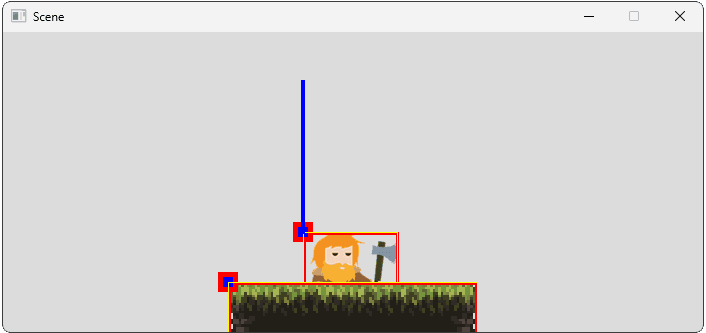
};Now, when you run the game, the "Player" entity will fall due to gravity (from its PhysicsComponent). As it falls, its CollisionComponent's Bounds will update. The Scene::CheckCollisions() loop will compare the player's bounds with the floor's bounds on every tick.
Once they overlap, you'll see "Collision detected..." messages printed to the console, and the yellow debug rectangles will visually confirm the overlap.
Collision detected between Entity 0 and Entity 1!
Collision detected between Entity 0 and Entity 1!
Collision detected between Entity 0 and Entity 1!
// ...The player still passes through the floor because we haven't implemented any collision response yet. That's the topic for the next lesson!
Complete Code
Here are the complete CollisionComponent.h/.cpp files and the updated Scene.h/.cpp and Entity.h files incorporating the changes from this lesson.
Files
Summary
In this lesson, we created a CollisionComponent that defines the physical shape of our entities for interaction. This component calculates its bounding box (Bounds) each frame based on its owner's TransformComponent and its own offset and size properties.
We implemented a basic IsCollidingWith method using SDL's intersection functions and integrated a scene-level check to detect overlaps between entities. Debug drawing helps visualize these collision bounds.
Key takeaways:
CollisionComponentdefines shape (Offset,Width,Height) relative to theTransformComponentorigin.Bounds(SDL_FRect) is calculated each frame inTick(), incorporating owner position and scale.- The component relies on
TransformComponent, checked duringInitialize(). - Collision detection (
IsCollidingWith) comparesBoundsof two components. - Scene-level collision checks iterate through entity pairs, currently requiring checks.
- Debug drawing of
Boundsis crucial for verifying collision shapes and detection.
Our entities can now detect collisions, but they don't yet react to them. Implementing collision response (stopping, bouncing, taking damage, etc.) will be the focus of the next lesson.
Collision Response
Make entities react realistically to collisions, stopping, bouncing, and interacting based on type.