Positioning and Rendering Entities
Updating our TransformComponent and ImageComponent to support positioning and rendering
Now that we have images loaded via our AssetManager, it's time to display them correctly in our game world. This lesson covers positioning entities and using SDL's blitting function to render images. Key steps include:
- Updating
TransformComponentto allow position changes. - Rendering
ImageComponentsurfaces usingSDL_BlitSurface(). - Adding relative offsets to
ImageComponentfor fine-tuning position. - Creating visual debug helpers for entity locations.
Positioning Entities
Currently, all of our entities are positioned at $(0, 0)$, the default value of our TransformComponent's Position vector.
We need a way to change this. Let's add a setter:
src/TransformComponent.h
#pragma once
#include "Vec2.h"
#include "Component.h"
class TransformComponent : public Component {
public:
using Component::Component;
Vec2 GetPosition() const {
return Position;
}
void SetPosition(const Vec2& NewPosition) {
Position = NewPosition;
}
void Move(const Vec2& Movement) {
Position += Movement;
}
private:
Vec2 Position{0, 0};
};Now, back in Scene.h, let's use this to position two entities in our scene. We'll define their positions using screen coordinates, where (0,0) is the top-left of the window.
We'll also give them each an ImageComponent, which we'll render later in the lesson:
src/Scene.h
// ...
class Scene {
public:
Scene() {
std::string BasePath{SDL_GetBasePath()};
EntityPtr& Player{Entities.emplace_back(
std::make_unique<Entity>(*this))};
Player->AddTransformComponent()
->SetPosition({100, 240});
Player->AddImageComponent(BasePath + "player.png");
EntityPtr& Enemy{Entities.emplace_back(
std::make_unique<Entity>(*this))};
Enemy->AddTransformComponent()
->SetPosition({250, 20});
Enemy->AddImageComponent(BasePath + "dragon.png");
}
// ...
};API Improvements
We expect to be accessing the entity's position frequently within our components, so let's add a helper function to the Component base class to make this friendlier.
We'll add GetOwnerPosition(), which retrieves the position from the owner's TransformComponent.
Files
Any of our components can now use this simpler API:
// Conceptual Example
class SomeComponent : public Component {
void SomeFunction() {
// Before
GetOwner()->GetTransformComponent()->GetPosition();
// After
GetOwnerPosition();
}
};Rendering Debug Helpers
It's often useful to "see" the invisible data in our game world, like the exact point our TransformComponent represents. We can achieve this using debug helpers: temporary graphics rendered only for developers. Let's create a way for components to draw their own debug information.
To set this up, we'll add a virtual function to our Component base class, including an SDL_Surface* argument specifying where the helpers should be drawn:
src/Component.h
// ...
class Component {
public:
// ...
virtual void DrawDebugHelpers(
SDL_Surface* Surface) {}
// ...
};If our build has enabled debug helpers through a preprocessor flag, our Entity will call this new DrawDebugHelpers() on all of its components. We typically draw debug helpers after everything else has rendered, as this ensures the helpers are drawn on top of the objects in our scene.
src/Entity.h
// ...
#define DRAW_DEBUG_HELPERS
class Entity {
public:
// ...
virtual void Render(SDL_Surface* Surface) {
for (ComponentPtr& C : Components) {
C->Render(Surface);
}
#ifdef DRAW_DEBUG_HELPERS
for (ComponentPtr& C : Components) {
C->DrawDebugHelpers(Surface);
}
#endif
}
// ...
};Rendering Entity Positions
Our positions are stored as float values in our Vec2 struct, but SDL rendering functions require integer coordinates.
Let's add a function to convert SDL_FRect objects (which use floats) to SDL_Rect objects (which use integers) by rounding the values. We'll define this function in a new Utilities header file and namespace so we can easily include it wherever it is needed:
src/Utilities.h
#pragma once
#include <SDL3/SDL.h>
#include <cmath>
namespace Utilities{
inline SDL_Rect Round(const SDL_FRect& R) {
return {
static_cast<int>(std::round(R.x)),
static_cast<int>(std::round(R.y)),
static_cast<int>(std::round(R.w)),
static_cast<int>(std::round(R.h)),
};
}
}Let's now combine GetPosition() and Utilities::Round() to override the DrawDebugHelpers() function in our TransformComponent. We'll have it draw a 20 x 20 pixel square, centered at its position:
src/TransformComponent.h
#pragma once
#include <SDL3/SDL.h> // for SDL_Surface
#include "Utilities.h" // for Round
#include "Vec2.h"
#include "Component.h"
class TransformComponent : public Component {
public:
// ...
void DrawDebugHelpers(SDL_Surface* S) override {
auto [x, y]{GetPosition()};
SDL_Rect Square{Utilities::Round({
x - 10, y - 10, 20, 20
})};
SDL_FillSurfaceRect(S, &Square, SDL_MapRGB(
SDL_GetPixelFormatDetails(S->format),
nullptr, 255, 0, 0));
}
private:
Vec2 Position{0, 0};
};We should now see red squares representing the position of the player and enemy entities we added to our Scene.
Rendering Images
In the previous section, we successfully loaded our images into SDL_Surfaces within our AssetManager, and our ImageComponent instances have a shared pointer to those surfaces. Now, let's use them to render our images to the screen!
The SDL function we need is SDL_BlitSurface().
Let's delete our placeholder Render() implementation in ImageComponent.cpp and implement the real logic.
We can get the coordinates we need using our GetOwnerPosition() function and the Round helper. Only the x and y values of our destination rectangle are relevant for SDL_BlitSurface(), so we'll just set w and h to 0:
src/ImageComponent.cpp
// ...
#include "Utilities.h"
// ...
void ImageComponent::Render(
SDL_Surface* Surface
) {
if (!ImageSurface) return;
auto [x, y]{GetOwnerPosition()};
SDL_Rect Destination{
Utilities::Round({x, y, 0, 0})
};
if (!SDL_BlitSurface(
ImageSurface.get(),
nullptr,
Surface,
&Destination
)) {
std::cerr << "Error: Blit failed: "
<< SDL_GetError() << '\n';
}
}
// ...Let's compile and run our project, and confirm that everything is working.
Positioning Images
Drawing our images at the entity's exact position works, but often we want the entity's TransformComponent position to represent its center instead of its top-left corner. Or maybe an entity has multiple ImageComponents that need to be positioned relative to each other.
To solve this, we need a way to draw the image with an offset relative to the entity's main position.
Let's add a Vec2 Offset member to ImageComponent and a SetOffset() method:
src/ImageComponent.h
// ...
#include "Vec2.h"
class ImageComponent : public Component {
public:
// ...
void SetOffset(const Vec2& NewOffset) {
Offset = NewOffset;
}
private:
// ...
Vec2 Offset{0, 0}; // Default to no offset
};Next, we need to use this offset when rendering. We'll modify ImageComponent::Render() to add the offset to the owner's position:
src/ImageComponent.cpp
// ...
void ImageComponent::Render(
SDL_Surface* Surface
) {
if (!ImageSurface) return;
auto [x, y]{
// Before:
GetOwnerPosition()
// After:
GetOwnerPosition() + Offset
};
}
// ...Drawing Debug Helpers
Let's add debug helpers to our ImageComponent class too. We'll draw a small blue rectangle at the image's rendering position (including the offset).
We'll override the DrawDebugHelpers() function in our header file, and implement it in our source file:
Files
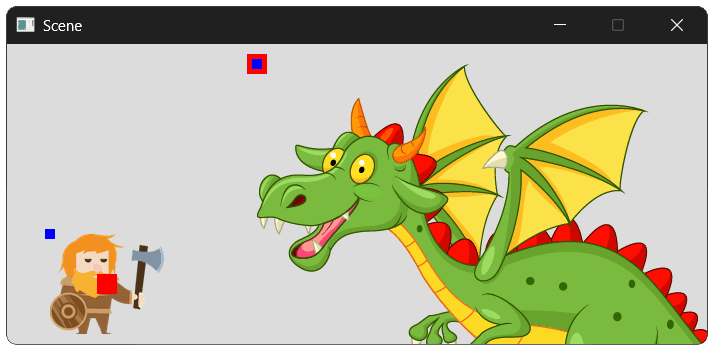
With our offset set to {0, 0}, we should see our TransformComponent (red) and ImageComponent (blue) rendering their debug squares in the same position.
Getting Image Dimensions
Calculating offsets often requires knowing the dimensions of the image being drawn (e.g., to find its center). Let's add helper methods GetSurfaceWidth() and GetSurfaceHeight() to ImageComponent.
Files
Now let's update Scene.h to center the player's image. We'll use SetOffset along with our new dimension getters.
src/Scene.h
// ...
class Scene {
public:
Scene() {
std::string BasePath{SDL_GetBasePath()};
EntityPtr& Player{Entities.emplace_back(
std::make_unique<Entity>(*this))};
Player->AddTransformComponent()
->SetPosition({100, 240});
ImageComponent* PlayerImage{
Player->AddImageComponent(BasePath + "player.png")
};
PlayerImage->SetOffset({
PlayerImage->GetSurfaceWidth() * -0.5f,
PlayerImage->GetSurfaceHeight() * -0.5f
});
EntityPtr& Enemy{Entities.emplace_back(
std::make_unique<Entity>(*this))};
Enemy->AddTransformComponent()
->SetPosition({250, 20});
Enemy->AddImageComponent(BasePath + "dragon.png");
}
// ...
};This will make the player image appear centered on its TransformComponent's position. The dragon will still be drawn from its top-left.
Complete Code
Below are the complete versions of the files we modified in this lesson.
Files
Summary
We connected our image data to the screen. We set up positioning for our entities, implemented rendering logic in ImageComponent using SDL_BlitSurface, and added offset support to allow precise image placement (like centering).
We also created debug helpers to visualize positions and added helper functions to Component and Utilities to streamline coordinate management.
Key Takeaways:
TransformComponentholds the entity's primary position.- Components use
GetOwnerPosition()to access this position easily. ImageComponentusesSDL_BlitSurface()to draw its sharedSDL_Surfaceto the screen.Utilities::Roundconverts floating-point positions (Vec2) to integer rectangles (SDL_Rect) for SDL rendering.- Offsets in
ImageComponentallow images to be positioned relative to the entity's origin (e.g., centering). - Debug helpers are essential for verifying that logical positions match visual output.
Image and Entity Scaling
Add width, height, and scaling modes to our entities and images