Breakout: Loading Levels
Add breakable bricks to the game by loading and parsing level files saved from our level editor.
So far, our game scene has been hard-coded. To create a real game, we need the ability to load different level layouts dynamically. This lesson will implement the level loading system, reading the .bin files generated by our editor and using them to build our game world.
We will create a Block entity to represent the bricks. The core of our work will be in the Block constructor and the BreakoutScene::Load() method, where we'll use SDL_IOStream to perform binary file reads.
We'll interpret the file's byte stream to determine each block's type and position, and then add the corresponding components to make them visible and collidable.
Once this system is in place, creating new levels for our game will be as simple as designing them in our editor and saving the file - no code changes required.
Deserializing Levels
In our editor project, we serialized data using the format provided below. We have three one-byte integers, representing the serialization version, width of the grid, and height of the grid respectively.
We then have a 4-byte integer, which lets us know how many actors (or entities) are in the level. We then have the data for those actors. The amount of actor data is unknown in advance - it depends on the number of actors and the type of those actors.
All multi-byte values use the little-endian (LE) order:

Let's expand our Load() function to load the serialized data. The following code assumes that the levels created by our level editor are stored in an "Assets/" directory alongside our executable, with file names like "Level1.bin".
We'll use SDL_ReadU8 and SDL_ReadU32LE to read the header values. In SDL3, these functions take a pointer to the variable where the data should be stored and return a boolean indicating success or failure.
Breakout/src/BreakoutScene.cpp
// ...
#include <format>
#include <iostream> // for std::cerr
void BreakoutScene::Load(int Level) {
// ...
std::string FileName{Config::BASE_PATH +
std::format("Assets/Level{}.bin", Level)
};
SDL_IOStream* Handle{
SDL_IOFromFile(FileName.c_str(), "rb")
};
if (!Handle) {
CheckSDLError("Loading Level");
return;
}
Uint8 FileVersion{0};
SDL_ReadU8(Handle, &FileVersion);
Uint8 GridWidth{0};
SDL_ReadU8(Handle, &GridWidth);
Uint8 GridHeight{0};
SDL_ReadU8(Handle, &GridHeight);
Uint32 BlockCount{0};
SDL_ReadU32LE(Handle, &BlockCount);
std::cout << std::format(
"Loading a version "
"{} level ({}x{}) with {} blocks\n",
FileVersion, GridWidth, GridHeight,
BlockCount
);
}Loading a version 1 level (13x6) with 55 blocksDeserializing Actors
Now that we've deserialized the fixed-size level data, let's work on deserializing the dynamic array of entities. Each actor in the array starts with a type, row, and column integer, each being a single byte. They then have a variable amount of additional data, depending on their type.
The following diagram shows an example where we have two actors in the array, but this pattern repeats for however many blocks are in the level, as represented by the BlockCount integer.

Most of our blocks have no additional data beyond their type, row, and column. However, in our editor project, we serialized some additional data from our green blocks as a proof of concept. We'll handle that additional data a bit later in this section.
Adding a Block Class
In our editor project, each block type was a different class. We could do the same here, but we don't need to.
We can get a lot of diverse behavior from the same object type, simply by changing which components that object has, and how those components are configured.
Let's create a Block type that all of our deserialized entities will use. Our constructor will accept the SDL_IOStream handle, and will start by grabbing the Type, Row, and Column values (in that order) from it:
Breakout/Block.h
#pragma once
#include <format>
#include <iostream>
#include <SDL3/SDL.h>
#include "Engine/ECS/Entity.h"
class Block : public Entity {
public:
Block(SDL_IOStream* Handle, BreakoutScene& Scene)
: Entity{Scene}
{
Uint8 Type{0};
SDL_ReadU8(Handle, &Type);
Uint8 GridRow{0};
SDL_ReadU8(Handle, &GridRow);
Uint8 GridCol{0};
SDL_ReadU8(Handle, &GridCol);
std::cout << std::format(
"Loaded type {} block (Row={}, Col={})\n",
Type, GridRow, GridCol
);
}
};Handling Additional Data
Beyond using data from the SDL_IOStream stream, our Block constructor additionally needs to advance the read/write offset within that stream such that, for the next block, the offset is at the start of that block's data.
Reading data using functions like SDL_ReadU8() automatically advances the offset. Therefore, as long as each invocation of the constructor is reading all the entity's data, the next block's constructor will be handed a stream whose offset is in the correct position - right at the start of the entity that the constructor is responsible for deserializing.
We are reading all the data for most of our block types but, in our editor project, we had our green blocks serialize some additional data, just to show how it could be done.
Our green block's serialization function is additionally saving a 16-bit integer, a second 32-bit integer representing the size of an array, and then that quantity of 32-bit integers. The code in our Editor to make that happen is shown below for reference:
Editor/src/Blocks.cpp
// ...
void GreenBlock::Serialize(SDL_IOStream* Handle) const {
Actor::Serialize(Handle);
SDL_WriteU16LE(Handle, SomeNumber);
SDL_WriteU32LE(Handle, Uint32(SomeArray.size()));
for (Sint32 Num : SomeArray) {
SDL_WriteU32LE(Handle, Num);
}
}
// ...We're not currently using that additional data in our block constructor so, when dealing with a green block, our byte offset is left in the wrong position. This means that every entity that we load after the green block will not be deserialized correctly.
When we encounter a green block, we should read all of those elements too. This ensures that, by the end of the constructor, the byte offset in our stream has advanced to the end of the object we're supposed to be deserializing.
When our constructor is dealing with a green block, the deserialized Type will have a value of 2. However, in our editor project, we added an ActorType enum in our config file which lets us map those type integers to more descriptive names. As such, we can cast that Type integer to an ActorType, and then check if it is equal to ActorType::GreenBlock.
We don't really need this additional green block data for our game, but let's log it out to confirm it's working:
Breakout/Block.h
// ...
#include "Config.h"
class Block : public Entity {
public:
Block(SDL_IOStream* Handle, BreakoutScene& Scene)
: Entity{Scene}
{
if (
static_cast<Config::ActorType>(Type) ==
Config::ActorType::GreenBlock
) {
std::cout << " Green Block Data: ";
Uint16 SomeNumber{0};
SDL_ReadU16LE(Handle, &SomeNumber);
std::cout << SomeNumber << ", [";
Uint32 ArraySize{0};
SDL_ReadU32LE(Handle, &ArraySize);
for (size_t i{0}; i < ArraySize; ++i) {
Uint32 ArrayValue{0};
SDL_ReadU32LE(Handle, &ArrayValue);
std::cout << ArrayValue
<< (i < ArraySize - 1 ? ", " : "");
}
std::cout << "]\n";
}
}
};Loading Actors
Now that we have our Block class and constructor set up, let's use it back in our BreakoutScene's Load() function to create all the entities we need:
Breakout/src/BreakoutScene.cpp
// ...
#include "Breakout/Block.h"
void BreakoutScene::Load(int Level) {
for (size_t i{0}; i < BlockCount; ++i) {
Entities.emplace_back(
std::make_unique<Block>(Handle, *this)
);
}
SDL_CloseIO(Handle);
}We should see our block data being loaded in our terminal output:
Loaded type 4 block (Row=4, Col=3)
Loaded type 1 block (Row=4, Col=2)
Loaded type 3 block (Row=4, Col=1)
Loaded type 2 block (Row=3, Col=2)
Green Block Data: 32, [1, 2, 3]
Loaded type 5 block (Row=3, Col=3)Seeking
In this section, we read our additional green block data to ensure our read/write offset was updated to the correct position. But there is an alternative approach: we could just update our byte offset directly.
If we don't need to read the additional data, we can instead just directly advance (or "seek") our read/write offset to the end of our current object.
To do this, we need to calculate how many bytes we need to seek forward, and then call SDL_SeekIO(). To use SDL_SeekIO(), we pass three arguments:
- The
SDL_IOStreamhandle - The offset we want to seek by
- How we want that offset to be used.
SDL_IO_SEEK_CURmeans we want the offset to be updated relative to its current position.
In the following example:
- We call
SDL_SeekIO()to advance past our 16-bit (2-byte) integer - We then read the next 32-bit integer so we can understand how many elements are in our array
- We then call
SDL_SeekIO()again to advance past the array. We know each element in the array is 32 bits (4 bytes), so we multiply that by the number of elements in the array
Breakout/Block.h
// ...
class Block : public Entity {
public:
Block(SDL_IOStream* Handle, BreakoutScene& Scene)
: Entity{Scene}
{
if (
static_cast<Config::ActorType>(Type) ==
Config::ActorType::GreenBlock
) {
SDL_SeekIO(Handle, 2, SDL_IO_SEEK_CUR);
Uint32 ArraySize{0};
SDL_ReadU32LE(Handle, &ArraySize);
SDL_SeekIO(
Handle, ArraySize * 4, SDL_IO_SEEK_CUR
);
}
}
};We covered SDL_SeekIO() and read/write offsets in general
Generalizing Dynamically Sized Entities
Our implementation depends on our deserialization function to know exactly which entities contain additional data, and the nature of that data.
In more advanced projects, we could solve this problem by serializing additional metadata to explain what is going on. For example, each entity could serialize an additional integer, representing its size:

Alternatively, our level could serialize an additional array, storing the size of each entity:

Or the offset of each entity within the data:

This would allow the deserialization logic to easily jump around within the data. It can use these size or position values to calculate the offset of the object it's interested in within the data, and then call SDL_SeekIO() to jump right to it.
Remember, when we update our serialization format, there will still be files out there using the older format. This means that anywhere we're deserializing those files may now need to support both versions.
This is why we typically include a version number in our serialized data - it helps our deserialization code easily understand what it's dealing with.
Positioning Blocks and Colliders
Finally, let's add image and collision components to our blocks to make them visible and interactive.
Mapping Images
The image associated with each Block entity will depend on the block's Type. We'll add a std::unordered_map to map those types to their associated image paths:
Breakout/Block.h
// ...
#include <unordered_map>
class Block : public Entity {
// ...
private:
using ImageMap = std::unordered_map<
Config::ActorType, std::string>;
using enum Config::ActorType;
inline static ImageMap Images{
{Actor, ""},
{BlueBlock, "Assets/Brick_Blue_A.png"},
{GreenBlock, "Assets/Brick_Green_A.png"},
{CyanBlock, "Assets/Brick_Cyan_A.png"},
{OrangeBlock, "Assets/Brick_Orange_A.png"},
{RedBlock, "Assets/Brick_Red_A.png"},
{YellowBlock, "Assets/Brick_Yellow_A.png"}
};
};Adding Components
Let's add our components. We'll add a TransformComponent, a CollisionComponent, and an ImageComponent. We'll need to reference these components later, so let's save their pointers as member variables:
Breakout/Block.h
// ...
#include "Engine/ECS/TransformComponent.h"
#include "Engine/ECS/ImageComponent.h"
#include "Engine/ECS/CollisionComponent.h"
class Block : public Entity {
public:
Block(SDL_IOStream* Handle, BreakoutScene& Scene)
: Entity{Scene}
{
Transform = AddComponent<TransformComponent>();
Collision = AddComponent<CollisionComponent>();
Image = AddComponent<ImageComponent>(
Config::BASE_PATH +
Images[static_cast<Config::ActorType>(Type)]
);
}
private:
TransformComponent* Transform{nullptr};
ImageComponent* Image{nullptr};
CollisionComponent* Collision{nullptr};
// ...
};Configuring Components
As our last step, let's position and size our blocks and their colliders so they appear in the correct location in our scene. Our editor is providing those positions as grid rows and columns, which we need to convert to suitable screen-space coordinates that work for our scene.
Our engine's components provide the methods we need for this. We can use the SetPosition() function of our transform component, the SetSize() function of the collision component, and the SetWidth() and SetHeight() methods on the image component.
In my case, a width of 55.4 and height of 27 works well, but you may need to use different values depending on your scene and images. Remember, you can enable the DRAW_DEBUG_HELPERS flag to help with this:
Breakout/Block.h
// ...
class Block : public Entity {
public:
Block(SDL_IOStream* Handle, BreakoutScene& Scene)
: Entity{Scene}
{
float Width{55.4f};
float Height{27.f};
Transform = AddComponent<TransformComponent>();
Transform->SetPosition(Vec2{
GridCol * Width,
GridRow * Height
});
Collision = AddComponent<CollisionComponent>();
Collision->SetSize(Width, Height);
Image = AddComponent<ImageComponent>(
Config::BASE_PATH +
Images[static_cast<Config::ActorType>(Type)]
);
Image->SetWidth(Width);
Image->SetHeight(Height);
}
// ...
};With these changes, we should now see the blocks positioned in our world, and our ball can bounce off them:
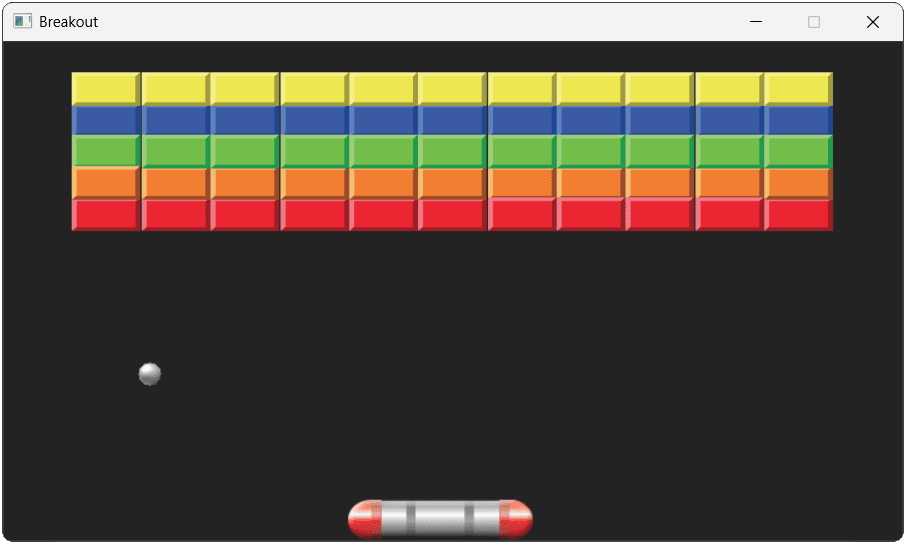
In the next section, we'll update our blocks to let them be destroyed when the ball hits them.
Complete Code
Complete versions of the files we updated in this section are available below:
Files
Summary
We've now successfully loaded our custom levels into the game, filling the screen with breakable bricks.
This lesson focused on deserialization, where we used SDL_IOStream to read the binary data we saved from our level editor. We created a Block class designed to be instantiated from a file stream and configured its components to match the loaded data.
Here are the key steps:
- We opened and read from a binary file using
SDL_IOFromFile(). - We parsed a byte stream containing level metadata and a dynamic array of actor data.
- We created a
Blockclass that deserializes itself from anSDL_IOStreamhandle. - We ensured our file parsing was robust by correctly handling variable-sized entity data either by reading those variables, or skipping past them using
SDL_SeekIO. - We converted the editor's grid coordinates into screen-space positions for our game.
Breakout: Game Progression
Implement the core gameplay loop of destroying blocks and advancing through levels using SDL3 events.