Breakout: Final Touches
Learn to manage game states for winning, losing, and pausing, and prepare the final game for distribution.
Welcome to the home stretch! In this last lesson, we'll add the finishing touches that turn our Breakout project into a complete, replayable game. Our focus will be on the overall game flow - managing how the game begins, how it can be won or lost, and how it can be started again.
We'll implement a GameState enum to keep track of the current situation. We'll use this state to trigger a loss when the ball misses the paddle and to provide visual feedback to the player when they win or lose. We'll also add a pause system, so the action doesn't start until the player is ready, and a simple keypress to restart the entire game from level one.
Finally, we'll look at how to prepare our project for distribution by creating a "release" build configuration that strips out the level editor and other development tools, leaving us with a clean, standalone game.
Ending and Restarting Games
Finally, let's implement our game ending and restarting logic.
Tracking GameState
Let's begin by tracking what state the game is currently in - whether the player has won, lost, or the game is still in progress. This is likely to be useful to a wide variety of games, so we'll add it to the Scene base class in our engine. We'll default it to InProgress:
Engine/Scene.h
// ...
enum class GameState { InProgress, Won, Lost };
class Scene {
public:
// ...
GameState GetState() const { return State; }
void SetState(GameState NewState) {
State = NewState;
}
private:
// ...
GameState State{GameState::InProgress};
};We'll also set it back to InProgress every time we load a level:
Breakout/src/BreakoutScene.cpp
// ...
void BreakoutScene::Load(int Level) {
// ...
SetState(GameState::InProgress);
}Back in our BreakoutScene class, let's set this state in response to the GAME_WON and GAME_LOST events. We're not yet broadcasting a GAME_LOST event, but we'll handle that in the next section:
Breakout/BreakoutScene.h
// ...
class BreakoutScene : public Scene {
public:
// ...
void HandleEvent(const SDL_Event& E) {
Scene::HandleEvent(E);
using namespace UserEvents;
if (E.type == BLOCK_DESTROYED) {
--BlocksRemaining;
if (BlocksRemaining == 0) {
CompleteLevel();
}
}
#ifdef ENABLE_CHEATS
else if (E.type == SDL_EVENT_KEY_DOWN &&
E.key.key == SDLK_C
) {
CompleteLevel();
}
#endif
else if (E.type == LAUNCH_LEVEL) {
Load(E.user.code);
} else if (E.type == GAME_WON) {
SetState(GameState::Won);
} else if (E.type == GAME_LOST) {
SetState(GameState::Lost);
}
}
// ...
};Losing Games
When the player misses the ball with their paddle, we want the game to end. We can detect this if the ball collides with our bottom wall. When that happens, we'll push our GAME_LOST event:
Breakout/Wall.h
// ...
#include "Breakout/Ball.h"
// ...
class Wall : public Entity {
public:
// ...
void HandleCollision(Entity& Other) override {
if (
dynamic_cast<Ball*>(&Other) &&
Position == WallPosition::Bottom
) {
SDL_Event E{};
E.type = UserEvents::GAME_LOST;
SDL_PushEvent(&E);
}
}
// ...
};Restarting
We'll let the player restart the game by pressing the "R" key. When we detect that event, we'll set our game state back to InProgress, and load the first level:
Breakout/BreakoutScene.h
// ...
class BreakoutScene : public Scene {
public:
// ...
void HandleEvent(const SDL_Event& E) {
Scene::HandleEvent(E);
using namespace UserEvents;
else if (
E.type == SDL_EVENT_KEY_DOWN &&
E.key.key == SDLK_R
) {
SetState(GameState::InProgress);
Load(1);
}
}
// ...
};Reacting to Game Loss and Victory
Now that win and loss events are being broadcast through our program, we're free to make any part of our application react to those events in the usual ways. Alternatively, we can check the state of our game at any time using the scene's GetState() function.
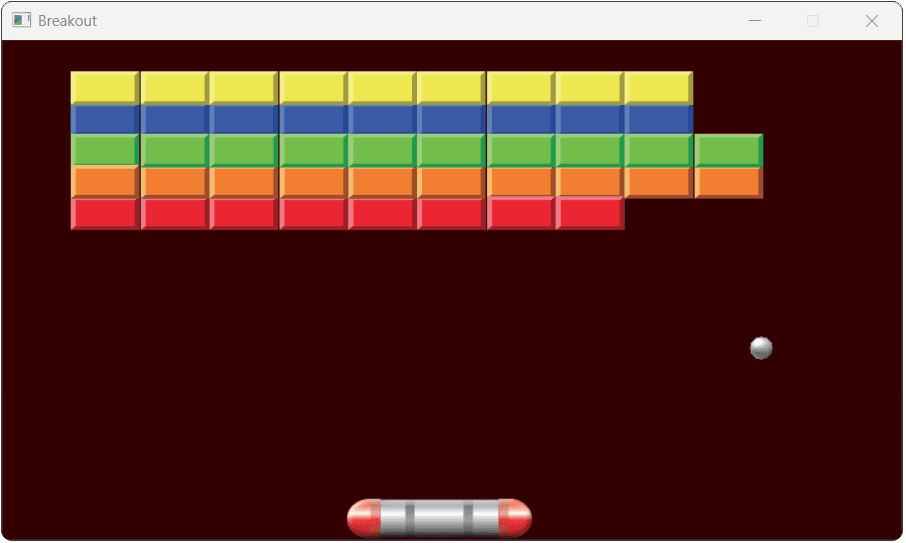
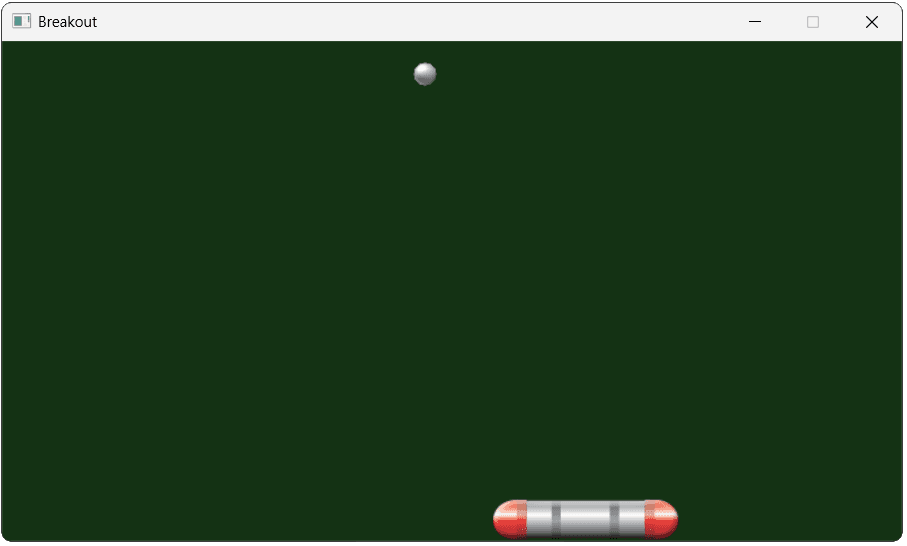
For example, let's override our scene's Render() function to change the background color depending on the game state. We'll fill the surface with a solid color first, and then call the base Scene's Render() method to render our entities on top of that rectangle:
Breakout/BreakoutScene.h
// ...
class BreakoutScene : public Scene {
public:
// ...
void Render(SDL_Surface* Surface) {
const auto* Fmt{SDL_GetPixelFormatDetails(
Surface->format
)};
if (GetState() == GameState::Won) {
SDL_FillSurfaceRect(Surface, nullptr,
SDL_MapRGB(Fmt, nullptr, 20, 50, 20)
);
} else if (GetState() == GameState::Lost) {
SDL_FillSurfaceRect(Surface, nullptr,
SDL_MapRGB(Fmt, nullptr, 50, 0, 0)
);
}
Scene::Render(Surface);
}
// ...
};With those changes, our background turns red when we lose:
And green when we win:
Pausing the Game
For our final feature, let's implement pausing. To support a paused state, let's first allow our physics and input to be paused. We'll pause them simply by disabling them, so let's update those components to support that.
Disabling Physics
To have our physics component pause when it is disabled, we can simply stop all of the updates that happen in our Tick() function:
Engine/ECS/src/PhysicsComponent.cpp
// ...
void PhysicsComponent::Tick(float DeltaTime) {
if (!GetIsEnabled()) return;
}
// ...Again, we may want to take this further. For example, in our current implementation, a disabled physics component will still allow ApplyForce() and ApplyImpulse() to be used. The effect of those will be to change the acceleration and velocity of the component, which will be used as soon as it's unpaused.
This may be the preferred approach. Alternatively, it may be more intuitive to have the component effectively ignore those instructions when disabled, perhaps with an error message.
Disabling Physics on Slow Frames
The time between frames, DeltaTime, is usually very small. However, our program can sometimes stall for a much longer period.
This might be because the operating system is busy, another application is hogging resources, or we may even pause our program intentionally in a debugger.
When our program starts responding again, a huge DeltaTime will have accumulated and, when multiplied by our Velocity, the ball may move a very large distance in a single step.
This can break our game, as it can make our ball move further than the thickness of our walls in a single step. This will cause the collision to be missed and the ball to no longer be within the window.
We can rarely detect that our program is going to stop updating in advance. Instead, on each iteration of our application loop, we can check if it has been a long time since the previous iteration. Below, we'll prevent our physics component from ticking on any iteration that takes longer than 0.1 seconds:
Engine/ECS/src/PhysicsComponent.cpp
// ...
void PhysicsComponent::Tick(float DeltaTime) {
if (DeltaTime > 0.1) return;
// ...
}
// ...An easy way to test this behavior on Windows is to move the window whilst our game is running. When this happens, Windows will pause the execution of our application loop. With our new DeltaTime check, as long as that pause is longer than 100 milliseconds, our physics simulation will pause too.
Move options to deal specifically with how our application can detect and respond to the user dragging the window are discussed in this thread on SDL's GitHub repository.
Disabling Input
Our current input commands are setting the velocity of the physics component so, when the physics component is disabled, the input component is effectively disabled too.
However, that won't be true for any other inputs we might potentially use in the future, so let's explicitly support disabling our InputComponent.
To prevent inputs from having any effect on a disabled input component, it also shouldn't tick, which will therefore stop it from polling the keyboard state. We should also disable the HandleEvent() logic so that the input component stops responding to SDL_EVENT_KEY_DOWN events:
Engine/ECS/src/InputComponent.cpp
// ...
void InputComponent::Tick(float DeltaTime) {
if (!GetIsEnabled()) return;
}
void InputComponent::HandleEvent(
const SDL_Event& E) {
if (!GetIsEnabled()) return;
}Triggering the Game Pause
Currently, our ball starts moving as soon as the program starts. That can be a little annoying, so let's open the game in a paused state, and only start the level when the player is ready.
We'll do this by disabling our paddle's PhysicsComponent and InputComponent, and our ball's PhysicsComponent.
Let's add a new private helper function, and call it in the constructor:
Breakout/Paddle.h
// ...
class Paddle : public Entity {
public:
Paddle(BreakoutScene& Scene) : Entity{Scene} {
// ...
SetIsPaused(true);
}
// ...
private:
void SetIsPaused(bool isPaused) {
Input->SetIsEnabled(!isPaused);
Physics->SetIsEnabled(!isPaused);
}
// ...
};We implement similar logic for our ball. We mostly care about the PhysicsComponent so we stop the ball from moving, but we can additionally toggle the CollisionComponent as a optional optimization. It reduces event traffic when the game is lost but the ball continues to overlap with the bottom wall, thereby causing additional GAME_LOST events to be broadcast every tick.
Breakout/Ball.h
// ...
class Ball : public Entity {
public:
Ball(BreakoutScene& Scene) : Entity{Scene} {
// ...
SetIsPaused(true);
}
// ...
private:
void SetIsPaused(bool isPaused) {
Physics->SetIsEnabled(!isPaused);
Collision->SetIsEnabled(!isPaused);
}
};If we run our game now, it starts in a paused state. Every time we load a new level, we load a new ball and paddle, so we also effectively pause between levels.
Unpausing the Game
We'll let the user press their space bar to start each level. When they do that, and the game is in the InProgress state (that is, they haven't already won or lost), then we'll unpause our paddle:
Breakout/Paddle.h
// ...
class Paddle : public Entity {
public:
// ...
void HandleEvent(const SDL_Event& E) override {
if (
E.type == SDL_EVENT_KEY_DOWN &&
E.key.key == SDLK_SPACE &&
GetScene().GetState() == GameState::InProgress
) {
SetIsPaused(false);
} else if (
E.type == UserEvents::GAME_WON ||
E.type == UserEvents::GAME_LOST
) {
SetIsPaused(true);
}
}
// ...
};And similarly, for our ball:
Breakout/Ball.h
// ...
class Ball : public Entity {
public:
// ...
void HandleEvent(const SDL_Event& E) override {
if (
E.type == SDL_EVENT_KEY_DOWN &&
E.key.key == SDLK_SPACE &&
GetScene().GetState() == GameState::InProgress
) {
SetIsPaused(false);
} else if (
E.type == UserEvents::GAME_WON ||
E.type == UserEvents::GAME_LOST
) {
SetIsPaused(true);
}
}
// ...
};Refactoring Duplicate Code
We just added some duplicate code across our Paddle and Ball classes, with the HandleEvent() function in particular being identical. A small amount of duplication - particularly at the end of the project - isn't particularly problematic.
However, if we found ourselves needing to repeated this a third time, or if we were going to expand these functions with more identical logic in the future, we should consider refining our approach.
Our component system often gives us the natural way of solving problems like this - creating a new component that our entities can share. For example, a BreakoutPauseManager component might look something like this:
Breakout/BreakoutPauseManager.h
#pragma once
#include "Engine/ECS/Component.h"
#include "Engine/ECS/PhysicsComponent.h"
#include "Engine/ECS/InputComponent.h"
#include "Config.h"
class BreakoutPauseManager : public Component {
public:
BreakoutPauseManager(Entity* Parent)
: Component{Parent} {
SetIsPaused(true);
}
void HandleEvent(const SDL_Event& E) override {
if (
E.type == SDL_EVENT_KEY_DOWN &&
E.key.key == SDLK_SPACE &&
GetScene().GetState() == GameState::InProgress
) {
SetIsPaused(false);
} else if (
E.type == UserEvents::GAME_WON ||
E.type == UserEvents::GAME_LOST
) {
SetIsPaused(true);
}
}
private:
void SetIsPaused(bool isPaused) {
if (InputComponent* Input{
GetOwner()->GetComponent<InputComponent>()
}) {
Input->SetIsEnabled(!isPaused);
}
if (PhysicsComponent* Physics{
GetOwner()->GetComponent<PhysicsComponent>()
}) {
Physics->SetIsEnabled(!isPaused);
}
}
if (CollisionComponent* Collision{
GetOwner()->GetComponent<CollisionComponent>()
}) {
Collision->SetIsEnabled(!isPaused);
}
}
};We could then delete the HandleEvent() and SetIsPaused() functions from both our Paddle and Ball classes, and instead attach a BreakoutPauseManager component to them in their constructors:
Files
Excluding the Editor
With all our features in place, we're now ready to ship our game! The last step is to disable any undesirable preprocessor definitions (such as DRAW_DEBUG_HELPERS and ENABLE_CHEATS).
We also need to detach our editor from the project. Our files already include preprocessor directives that will exclude editor-specific logic when the WITH_EDITOR macro is not defined.
However, our editor source files are still being sent to the compiler, and that may cause compilation issues or other problems. The simplest way to solve this is to include the #ifdef checks in those files, too. This means that, when WITH_EDITOR isn't defined, those files will be empty by the time the compiler sees them.
For example:
Editor/src/Actor.cpp
#ifdef WITH_EDITOR
#endifA more elegant solution would involve conditionally not sending those files to be compiled at all. The build management tools included in most IDEs should let us automate this.
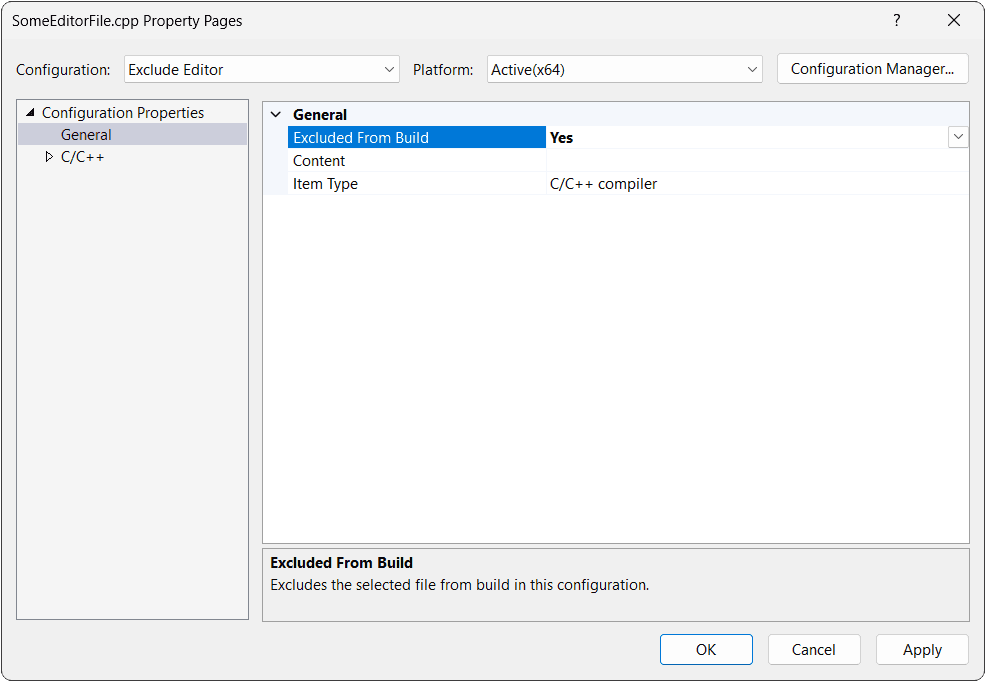
In Visual Studio, for example, you can select the files in the Solution Explorer, right-click on them, click on Properties, and set Excluded From Build to "Yes" for any build configuration that should not include the editor:
If you're using CMake, the simplest option is to set() a variable. We can then append the files to the build and set the preprocessor directive only if that variable is ON:
CMakeLists.txt
cmake_minimum_required(VERSION 3.16)
set(CMAKE_CXX_STANDARD 20)
# Change me to ON to enable the editor
SET(WITH_EDITOR OFF)
project(Breakout VERSION 1.0.0)
# List of source files excluding editor files
set(SOURCE_FILES
"main.cpp"
"Engine/src/Scene.cpp"
"Engine/ECS/src/Component.cpp"
"Engine/ECS/src/CollisionComponent.cpp"
"Engine/ECS/src/ImageComponent.cpp"
"Engine/ECS/src/PhysicsComponent.cpp"
"Engine/ECS/src/InputComponent.cpp"
"Engine/ECS/src/Commands.cpp"
"Breakout/src/BreakoutScene.cpp"
"Breakout/src/Ball.cpp"
)
# Add editor files to the list if WITH_EDITOR is ON
if(WITH_EDITOR)
list(APPEND SOURCE_FILES
"Editor/src/Button.cpp"
"Editor/src/Blocks.cpp"
"Editor/src/Actor.cpp"
"Editor/src/ActorTooltip.cpp"
"Editor/src/Level.cpp"
)
endif()
add_executable(Breakout
${SOURCE_FILES}
)
target_compile_definitions(Breakout PUBLIC
# CHECK_ERRORS
# ENABLE_CHEATS
# DRAW_DEBUG_HELPERS
)
# Conditionally set the WITH_EDITOR preprocessor definition
if(WITH_EDITOR)
target_compile_definitions(Breakout PUBLIC
WITH_EDITOR
)
endif()
target_include_directories(
Breakout PUBLIC
${PROJECT_SOURCE_DIR}
)
set(SDLTTF_VENDORED ON)
set(VENDOR_DIR "${PROJECT_SOURCE_DIR}/vendor")
add_subdirectory(${VENDOR_DIR}/SDL)
add_subdirectory(${VENDOR_DIR}/SDL_image)
add_subdirectory(${VENDOR_DIR}/SDL_ttf)
target_link_libraries(Breakout PRIVATE
SDL3::SDL3
SDL3_image::SDL3_image
SDL3_ttf::SDL3_ttf
)
set(AssetDirectory "${PROJECT_SOURCE_DIR}/Assets")
add_custom_command(
TARGET Breakout POST_BUILD
COMMAND
${CMAKE_COMMAND} -E copy_if_different
"$<TARGET_FILE:SDL3::SDL3>"
"$<TARGET_FILE:SDL3_image::SDL3_image>"
"$<TARGET_FILE:SDL3_ttf::SDL3_ttf>"
"$<TARGET_FILE_DIR:Breakout>"
COMMAND
${CMAKE_COMMAND} -E copy_directory_if_different
"${AssetDirectory}"
"$<TARGET_FILE_DIR:Breakout>/Assets"
VERBATIM
)With those changes, we can now easily prepare a version of our game that doesn't include our developer tools. Remember, our game still needs the output of those tools, such as the "Level1.bin" files.
Ensure that those are included alongside all the other assets (such as image files, fonts, and SDL's library files) that our program needs at run time.
Complete Code
Complete versions of all the files we updated in this lesson are available below:
Files
A zip file containing all of the code is available here:
The fonts and images used in our screenshots are available here:
Summary
Our Breakout clone is now finished! We introduced a GameState enum, implemented win and loss conditions, gave the player a way to restart, and created a pause system that activates at the start of levels and on game-end conditions.
Finally, we prepared our build system to easily exclude the editor for a release version.
Here's what we've accomplished in this project:
- We built a fully featured Breakout clone with multiple levels.
- We created a data-driven workflow with a separate level editor.
- We implemented a component-based engine for managing game entities.
- We handled player input, physics, and complex collision responses.
- We managed the overall game state, including winning, losing, pausing, and restarting.
Understanding Screen & World Space
Learn to implement coordinate space conversions in C++ to position game objects correctly on screen.