Breakout: Improving Paddle Physics
We'll add detailed collision logic to the paddle, giving the player control over the ball's trajectory.
Right now, our paddle behaves just like a moving wall. This is functional, but it doesn't give the player much control. In a classic Breakout game, where you hit the ball on the paddle determines its new direction. This lesson is all about implementing that nuanced physical interaction.
We will write code that calculates the precise point of impact on the paddle and uses that information to construct a new velocity for the ball. This will transform the gameplay from a simple reaction test into a game of skill, where players can aim their shots.
Additionally, we'll tackle a common problem in game physics: rapid, repeated collisions. We'll enhance our Component class with an isEnabled flag and use SDL_Timer to temporarily disable the paddle's collider after a hit, ensuring clean, single bounces.
Enhancing CollisionComponent
Before we start updating our paddle, let's update our CollisionComponent with some new capabilities that will be useful. We'll add a GetSize() method, that returns the values stored in the private Width and Height members that already exist.
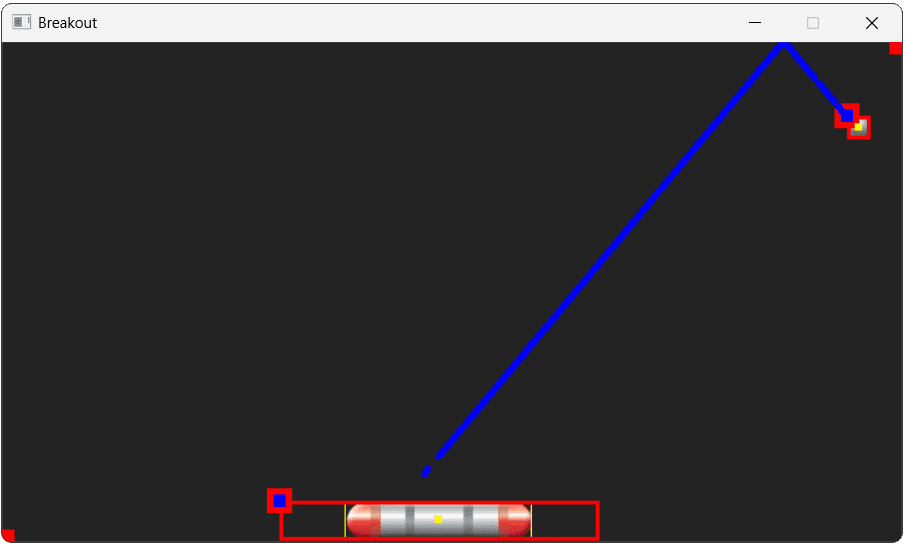
We'll also add a GetCenter() method, which will return the position at the center of the collision rectangle. Bounds is an SDL_FRect where the {x, y} position represents the top left of the rectangle. Therefore, to get the centre, we need to add half the width to the x value, and half the height to the y value:
Engine/ECS/CollisionComponent.h
// ...
class CollisionComponent : public Component {
public:
// ...
Vec2 GetSize() const { return {Width, Height}; }
Vec2 GetCenter() const {
const auto& [x, y, w, h]{GetBounds()};
return {
x + w / 2,
y + h / 2,
};
}
// ...
};Let's also update DrawDebugHelpers() to show this center using a small rectangle. We'll also add a Color variable so the previous code and our new rectangle can both share it:
Engine/ECS/src/CollisionComponent.cpp
// ...
void CollisionComponent::DrawDebugHelpers(
SDL_Surface* Surface
) {
SDL_Rect ScreenBounds{
Utilities::Round(Bounds)
};
Uint32 Color{SDL_MapRGB(
SDL_GetPixelFormatDetails(Surface->format),
nullptr, 255, 255, 0
)};
Utilities::DrawRectOutline(
Surface,
ScreenBounds,
// SDL_MapRGB(...)
Color,
1 // Thin line
);
auto [cx, cy]{GetCenter()};
SDL_Rect CenterRect{Utilities::Round({
cx - 3, cy - 3, 6, 6
})};
SDL_FillSurfaceRect(Surface, &CenterRect, Color);
}
// ...
Influencing Ball Direction
The code that allows the paddle to change the ball's velocity will be quite long, so let's split it off into a new private method. Within our HandleCollision() function, we'll call our new private helper if the collision was with a Ball.
Note that we need to #include the header for Ball to use it in dynamic_cast.
Breakout/Paddle.h
// ...
#include "Breakout/Ball.h"
class Paddle : public Entity {
public:
// ...
void HandleCollision(Entity& Other) override {
if (Ball* Ptr{dynamic_cast<Ball*>(&Other)}) {
HandleBallCollision(Ptr);
}
// ...
}
// ...
private:
void HandleBallCollision(Ball* BallPtr) {
// We'll implement this next
}
// ...
};The Plan
Calculating the velocity we want to apply to the ball can be done in three steps.
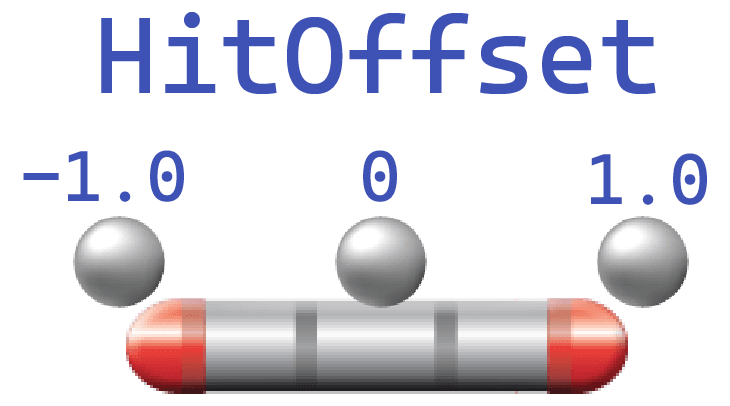
First, we'll compare the horizontal positions of our ball and paddle colliders using our new GetCenter() method. This will let us determine where on the paddle our ball hit. To make the future maths easier, we'll map this range to a value from -1.0 (far left) to 1.0 (far right)
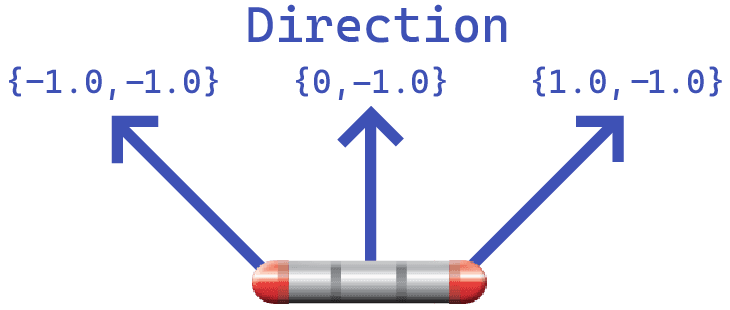
Next, we'll construct a vector representing the desired new direction of our ball. We'll use the value we calculated in the previous step to set the horizontal component, and we'll set the vertical component to a negative value, such as -1.0.
Remember that in our coordinate system, negative Y is "up".
We'll use this direction to set a new velocity for our ball. However, our direction vectors can have different lengths - for example, {-1, -1} is slightly longer than {0, -1}. So, we'll follow the typical approach of normalizing the vector to get one pointing the same direction but with a length of 1.0:
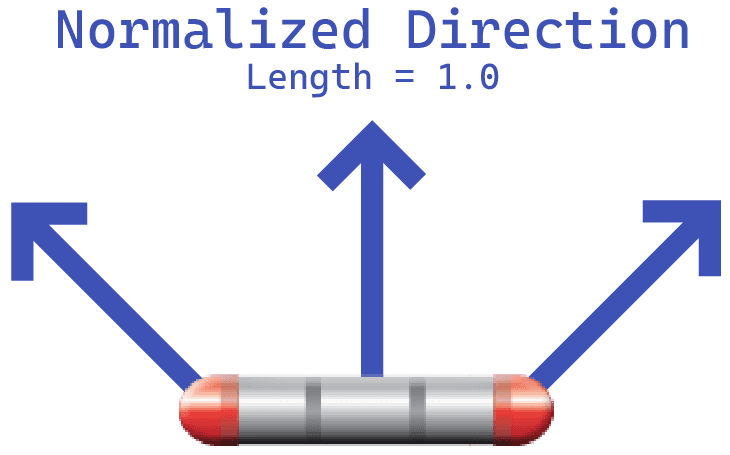
We can then multiply that normalized direction vector with the BALL_SPEED value we set in our config:
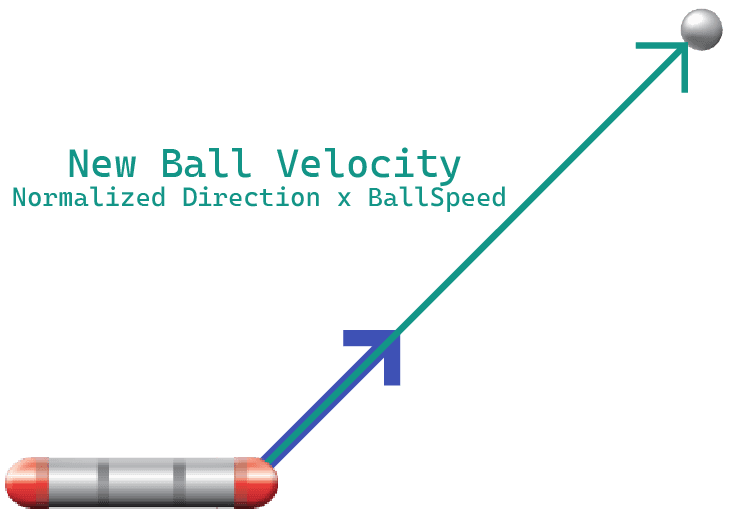
Let's implement this in code.
Getting Collision Point
In the previous section, we added GetCenter() and GetSize() functions to our collision components. We'll use them here to get the position of the ball relative to the paddle. We can do this simply by subtracting the ball's horizontal position from the paddle's horizontal position.
The maximum possible value this will return is half of the combined width of the paddle and ball, whilst its minimum will be the negative form of that same distance. For example, if our paddle's width was 100 and our ball's width was 20, this value would range from -60 to 60:
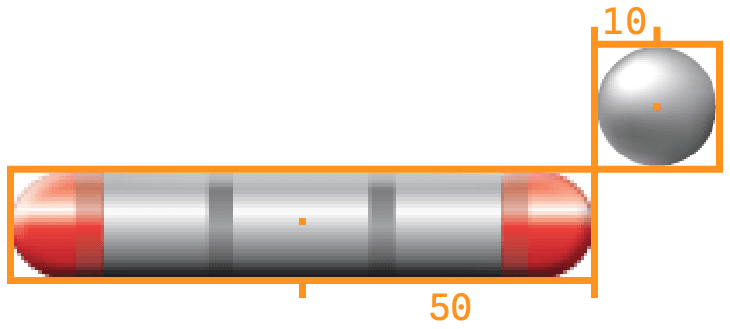
To convert this to a value ranging from -1 to 1, we'd divide it by 60. Or, more generally, we'd divide it by (PaddleWidth + BallWidth)/2.
We'll call this value HitOffset:
Breakout/Paddle.h
// ...
class Paddle : public Entity {
// ...
private:
void HandleBallCollision(Ball* BallPtr) {
Vec2 PaddlePos{Collision->GetCenter()};
float PaddleWidth{Collision->GetSize().x};
CollisionComponent* BallCollision{
BallPtr->GetComponent<CollisionComponent>()
};
Vec2 BallPos{BallCollision->GetCenter()};
float BallWidth{BallCollision->GetSize().x};
// Where on the paddle the ball hit from
// -1.0 (left edge) to 1.0 (right edge)
float HitOffset{
(BallPos.x - PaddlePos.x) / (
(PaddleWidth + BallWidth) / 2
)
};
}
// ...
};Creating Direction Vector
Next, we'll use this offset to create a direction vector. We want the horizontal direction to be influenced by where the ball hit the paddle, so we'll set the x component to be our HitOffset value.
We always want the ball to start moving upwards after hitting the paddle. In our coordinate system, "up" is negative Y, so we'll set the y component to -1.0:
Breakout/Paddle.h
// ...
class Paddle : public Entity {
// ...
private:
void HandleBallCollision(Ball* BallPtr) {
Vec2 Direction{HitOffset, -1.0f};
}
// ...
};Setting New Velocity
Finally, we'll use this direction vector to update the ball's velocity, using the SetVelocity() function of its PhysicsComponent.
We want the ball's speed - that is, the magnitude of its velocity - to match what we set in the configuration file.
To do this, we'll first normalize the Direction vector to generate a vector with the same direction, but a magnitude of . We'll then multiply this unit vector by the speed we want the ball to have multiplied by our PIXELS_PER_METER constant, which is stored in our Config::Breakout namespace:
Breakout/Paddle.h
// ...
class Paddle : public Entity {
// ...
private:
void HandleBallCollision(Ball* BallPtr) {
PhysicsComponent* BallPhysics{
BallPtr->GetComponent<PhysicsComponent>()
};
BallPhysics->SetVelocity(
Direction.Normalize() *
Config::Breakout::BALL_SPEED *
Scene::PIXELS_PER_METER
);
}
// ...
};Dynamic Speed
In our program, the speed of our ball is constant, so we can just retrieve its value from the config header. However, as a reminder, we can get the current speed of an object by getting the length of its current velocity.
If we didn't know the speed of our ball at compile time, our previous example could be written like this:
// ...
class Paddle : public Entity {
// ...
private:
void HandleBallCollision(Ball* BallPtr) {
// ...
BallPhysics->SetVelocity(
Direction.Normalize() *
Config::Breakout::BALL_SPEED *
Scene::PIXELS_PER_METER
BallPhysics->GetVelocity().GetLength()
);
}
// ...
};Modifying Direction Vector
Given HitOffset is in the range -1.0, to 1.0, our pre-normalized direction vector will range from {-1, -1} to {1, -1}. This corresponds to our ball's direction after bounding off our paddle ranging from -45 degrees to 45 degrees relative to straight up.
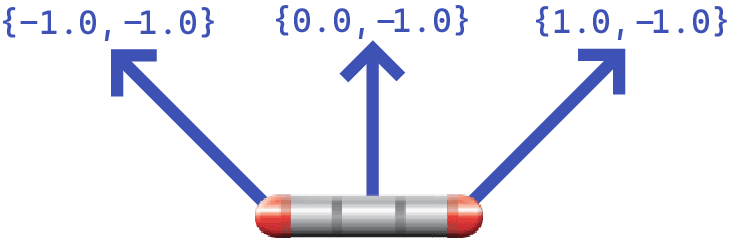
We can make this directional effect weaker or stronger by applying a coefficient to our HitOffset value before normalizing the vector. For example, applying a coefficient of 2.0 would strengthen the effect, making the range of output directions look like this:
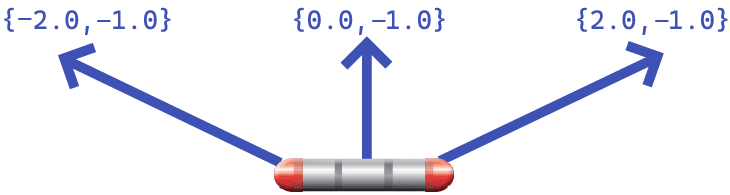
In code, it might look like this:
Breakout/Paddle.h
// ...
class Paddle : public Entity {
// ...
private:
void HandleBallCollision(Ball* BallPtr) {
// ...
float Strength{2.0};
Vec2 Direction{HitOffset, -1.0f};
Vec2 Direction{HitOffset * Strength, -1.0f};
// ...
}
// ...
};Disabling Bidirectional Interactions
Now that our paddle is setting the velocity of our ball in response to the collision, having our ball's bouncing logic also trigger as a result of that collision may cause some conflicting interactions.
We can prevent our Ball from reacting to Paddle collisions, but continue to react to other collisions, by returning early if it detects the Other entity is the paddle:
Breakout/src/Ball.cpp
// ...
#include "Breakout/Paddle.h"
void Ball::HandleCollision(Entity& Other) {
if (dynamic_cast<Paddle*>(&Other)) {
return;
}
// ...
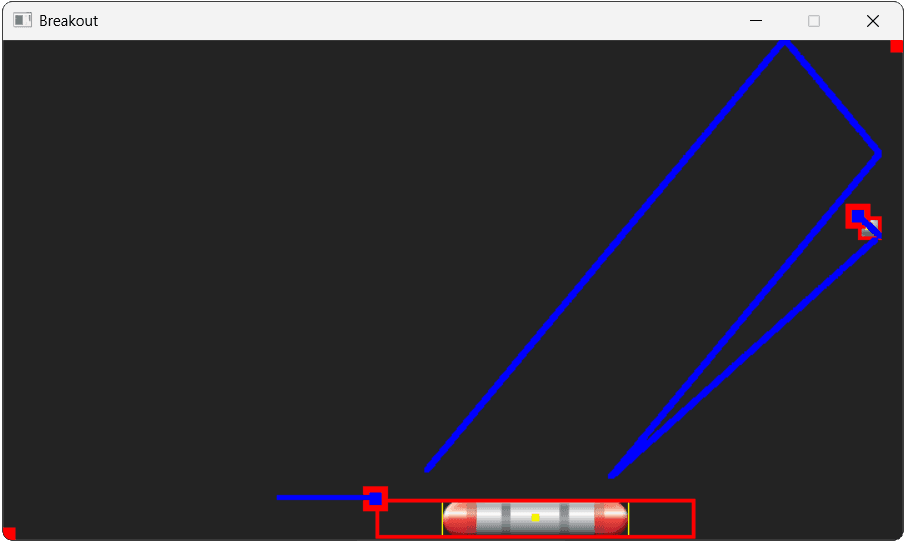
}With these changes, we can now exhibit some control over the ball's movement by bouncing it off different parts of our paddle:
Disabling Components
In our current implementation, we can possibly create a situation where the ball collides with our paddle multiple times in quick succession. This is more likely to happen if the ball hits the side of the paddle, whilst the paddle is also moving towards the ball.
This is a relatively common problem in physics systems, and we can address it by disabling a collider for a brief moment after it hits something.
The ability to "disable" a component is quite useful in general, so let's add this capability to the base Component class in our Engine/ECS directory.
Adding isEnabled to Component
To support this feature, we'll add a private isEnabled value, defaulted to true, alongside getters and setters:
Engine/ECS/Component.h
// ...
class Component {
public:
// ...
void SetIsEnabled(bool Enabled) {
isEnabled = Enabled;
}
bool GetIsEnabled() const {
return isEnabled;
}
private:
// ...
bool isEnabled{true};
};Disabling Collision Components
Classes that derive from Component can now decide how they should act when they have been disabled. We'll implement this for the CollisionComponent in this section and for some more components later in the project.
The most important effect of a collision component being disabled is that it should no longer result in HandleCollision() calls being made.
This logic is currently implemented in our Scene.cpp file, so let's update it:
Engine/src/Scene.cpp
// ...
void Scene::CheckCollisions() {
for (size_t i{0}; i < Entities.size(); ++i) {
CollisionComponent* ColA{
Entities[i]
->GetComponent<CollisionComponent>()
};
if (!ColA) {
if (!(ColA && ColA->GetIsEnabled())) {
continue;
}
for (size_t j{i+1}; j < Entities.size(); ++j) {
CollisionComponent* ColB{
Entities[j]
->GetComponent<CollisionComponent>()
};
if (!ColB) {
if (!(ColB && ColB->GetIsEnabled())) {
continue;
}
// ...
}
}
}
// ...Updating some behaviors in the CollisionComponent class may also be warranted, but it's less obvious what should happen there. For example, if the component stops ticking, that means its position stops updating, and functions like GetCenter() will report the wrong value.
We could update a function like IsCollidingWith() to always return false if the component is disabled, but that may also be unintuitive.
However, it does seem safe to at least update DrawDebugHelpers() to represent the component being disabled. Previously, it was always rendered in yellow. Let's update it to render in orange when it is disabled:
Engine/ECS/src/CollisionComponent.cpp
// ...
void CollisionComponent::DrawDebugHelpers(
SDL_Surface* Surface
) {
SDL_Rect ScreenBounds{
Utilities::Round(Bounds)
};
Uint32 Color{SDL_MapRGB(
SDL_GetPixelFormatDetails(Surface->format),
nullptr, 255, 255, 0
)};
const auto* Fmt{SDL_GetPixelFormatDetails(
Surface->format
)};
Uint32 Color{SDL_MapRGB(
Fmt, nullptr, 255, 255, 0
)};
if (!GetIsEnabled()) {
Color = SDL_MapRGB(
Fmt, nullptr, 255, 165, 0
);
}
Utilities::DrawRectOutline(
Surface,
ScreenBounds,
Color,
1 // Thin line
);
// ...
}
// ...Preventing Double Collisions
Back in our Paddle class, we can now simply call this function when we want to disable or enable collisions. Let's disable them when a collision happens, and we'll work on enabling them again a few moments later in the next section:
Breakout/Paddle.h
// ...
class Paddle : public Entity {
public:
// ...
void HandleCollision(Entity& Other) override {
if (Ball* Ptr{dynamic_cast<Ball*>(&Other)}) {
HandleBallCollision(Ptr);
Collision->SetIsEnabled(false);
}
}
// ...
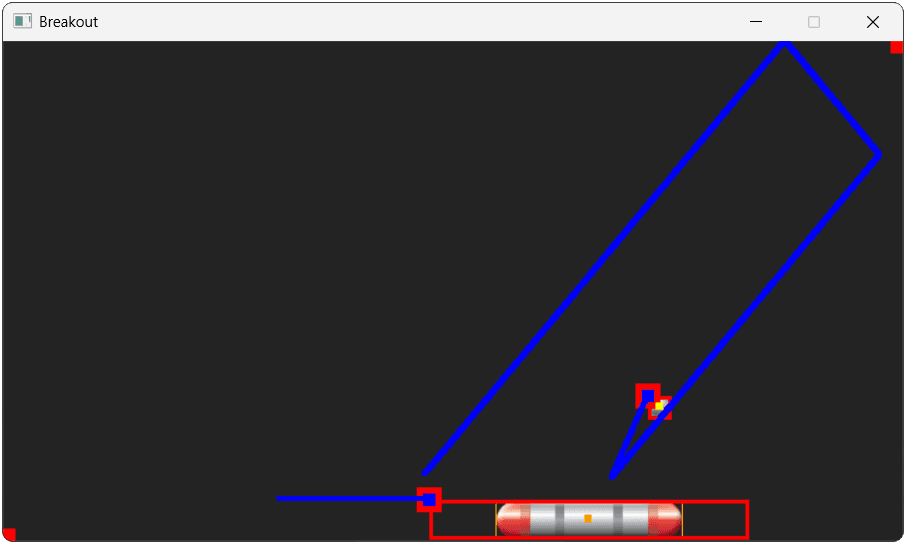
};We should now see our paddle's collider rendering in orange after a collision, and our ball should pass right through it in this state:
Reenabling Collisions on a Timer
To enable collisions after a brief pause, let's use the SDL_Timer techniques we covered
To set a timer, we pass three arguments to SDL_AddTimer():
- The interval, in milliseconds
- A callback function that we want to invoke at the end of the timer
- A pointer to some data we want to pass to the callback function. This argument is a void pointer (
void*) so we can pass a pointer to anything, or anullptrif we don't need any additional data.
Let's set a timer to enable our collisions after 500 milliseconds. We'll implement this behavior in a function called Paddle::EnableCollision, and we'll pass a pointer to ourselves (this) as the final argument.
We'll need the timer ID returned by this function later, so let's save it as a member variable:
Breakout/Paddle.h
// ...
class Paddle : public Entity {
public:
// ...
void HandleCollision(Entity& Other) override {
if (Ball* Ptr{dynamic_cast<Ball*>(&Other)}) {
HandleBallCollision(Ptr);
Collision->SetIsEnabled(false);
TimerID = SDL_AddTimer(
500, &Paddle::EnableCollision, this
);
}
}
private:
// ...
SDL_TimerID TimerID{0};
static Uint32 EnableCollision(
void* Entity, SDL_TimerID, Uint32
) {
Paddle* Target{static_cast<Paddle*>(Entity)};
// Memory issue here - see next section
if (Target && Target->Collision) {
Target->Collision->SetIsEnabled(true);
}
return 0;
}
};The callback we pass to SDL_AddTimer() must be a function that matches the SDL_TimerCallback signature. In SDL3, this signature is:
Uint32 SDLCALL TimerCallback(
void *userdata, SDL_TimerID timerID, Uint32 interval
);- The
userdataparameter is the pointer we passed toSDL_AddTimer(), so it is the pointer to ourPaddleinstance. - The
timerIDis the unique ID for this timer event. - The
intervalis the elapsed time. - The return value allows us to repeat the timer by passing the next interval, which will cause the function to be invoked again after that many milliseconds. We can pass
0if we don't need the timer to repeat, which is what we want in this case.
The function passed to SDL_AddTimer() must be a free function or a static member function, which we've done here.
To enable our collider from this function, we need to cast the void pointer to a Paddle*, and then call SetIsEnabled() on its collision component.
Note that the above code isn't memory-safe. We'll explain why and fix it in the next section.
With these changes, our paddle's collider should now re-enable 500 milliseconds after the collision:
Fixing Timer Issues
When working with asynchronous code such as timers, we should be more mindful of things that can go wrong. Whilst synchronous code typically only needs to worry about the state of the program right now, asynchronous code needs to consider what might happen between us setting up the timer, and that callback being invoked in the future.
For example, what if HandleCollision() is called a second time, whilst our timer is still running? Our callback is still going to be called on its original schedule, meaning collisions will be reenabled again sooner than we intended:

This second collision is not currently possible in our program - HandleCollision() is only called by Scene, and Scene will not call it if the collision component is disabled.
However, we can still be safe and ensure Paddle() is internally consistent. HandleCollision() is a public function, so we should be prepared for external code to call it at any time. To handle this situation more gracefully, when HandleCollision() is called, we can cancel the existing timer, if there is one

In code, it might look like this:
Breakout/Paddle.h
// ...
class Paddle : public Entity {
public:
// ...
void HandleCollision(Entity& Other) override {
if (Ball* Ptr{dynamic_cast<Ball*>(&Other)}) {
HandleBallCollision(Ptr);
Collision->SetIsEnabled(false);
if (TimerID != 0) {
SDL_RemoveTimer(TimerID);
}
TimerID = SDL_AddTimer(
500, &Paddle::EnableCollision, this
);
}
}
~Paddle() {
if (TimerID) {
SDL_RemoveTimer(TimerID);
}
}
// ...
};Memory-Safe Timers
The second thing we should be mindful of is the state of our program at the time the callback is invoked. What state could our paddle be in? Does the paddle even still exist?
Currently, our paddle remains alive for the duration of our program, but we'll be changing that soon. If the paddle is deleted between the timer starting and the callback being invoked, the void* the callback receives will be a dangling pointer.
To address this, we should also remove our timer when the paddle is destroyed. We've already added the ~Paddle destructor above to handle this.
Rule of Three
Now that we've intervened in the object destruction process, the rule of three should prompt us to consider whether we need to intervene in the copying process, too. Will our paddle objects be compatible with the default copy behavior?
Unfortunately, they won't, as copies will have the same TimerID as the original object. This means that paddle objects risk calling SDL_RemoveTimer() for timers that they did not create, and aren't responsible for managing.
In our case, we don't need to fix this, because we don't need paddles to be copyable. So instead, let's make that explicit by deleting the copy constructor and copy assignment operators:
Breakout/Paddle.h
// ...
class Paddle : public Entity {
public:
// ...
Paddle& operator=(const Paddle& Other) = delete;
Paddle(const Paddle& Other) = delete;
// ...
};Complete Code
Complete versions of the files we created in this lesson are below:
Files
Summary
We've now added player control to our game by creating the paddle. This involved creating the Paddle entity, configuring its components, and writing the logic for its input and movement.
We customized the default keybindings, created a "release-to-stop" movement feel, and ensured the paddle can't leave the play area.
Here's an overview:
- We created a
Paddleentity and added it to our scene. - We learned to override default input bindings and unbind keys we don't need.
- We implemented a velocity reset in the
Paddle::Tick()function for responsive controls. - We added a reusable movement constraint feature to our
PhysicsComponent. - The player can now move the paddle to hit the ball.
In the next lesson, we'll move on to loading the levels we created in our map editor project.
Breakout: Loading Levels
Add breakable bricks to the game by loading and parsing level files saved from our level editor.