Breakout: Walls and Collision
We'll add invisible walls around the play area and write the collision response code to make the ball bounce.
Our ball is moving, but it flies off the screen forever. To create a playable game, we need to contain it within the play area. We'll achieve this by adding four invisible walls around the edges of our scene.
This lesson will guide you through creating a Wall entity. We'll instantiate four of them - for the top, bottom, left, and right boundaries - and give them collision components.
The core of this lesson, however, is implementing the collision response in our Ball class.
We'll start with a simple bouncing algorithm that works well in most cases. Then, we'll explore a more advanced, physically accurate method using vector math concepts like the dot product and surface normals.
By the end, our ball will be correctly bouncing around inside the game window.
Adding a Wall Class
To simulate our ball bouncing off the edges of the screen, we'll add four walls to our scene. They will sit just outside of the visible area - one on the top, one on the bottom, one on the left, and one on the right.
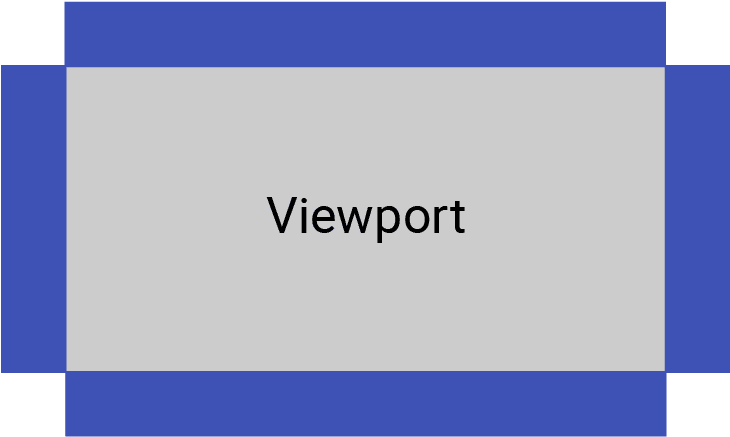
Let's start by adding a Wall class to manage this. We'll also add a WallPosition enum to represent the four states.
Eventually, colliding with the bottom wall will mean the player lost, so we'll store which position each wall is in as a member variable so we can implement this losing logic later.
We'll create this in a new file Breakout/Wall.h:
Breakout/Wall.h
#pragma once
#include "Engine/ECS/Entity.h"
#include "Engine/Scene.h"
enum class WallPosition {
Top, Bottom, Left, Right
};
class Wall : public Entity {
public:
Wall(WallPosition Position, Scene& Scene)
: Entity{Scene}, Position{Position} {}
private:
WallPosition Position;
};Back in our BreakoutScene's Load() method in BreakoutScene.cpp, let's add our four walls. Don't forget to include the new header.
Breakout/src/BreakoutScene.cpp
#include "Breakout/BreakoutScene.h"
#include "Breakout/Ball.h"
#include "Breakout/Wall.h"
void BreakoutScene::Load(int Level) {
Entities.clear();
Entities.emplace_back(
std::make_unique<Ball>(*this)
);
using enum WallPosition;
Entities.emplace_back(
std::make_unique<Wall>(Top, *this)
);
Entities.emplace_back(
std::make_unique<Wall>(Left, *this)
);
Entities.emplace_back(
std::make_unique<Wall>(Bottom, *this)
);
Entities.emplace_back(
std::make_unique<Wall>(Right, *this)
);
}Configuring Colliders
To collide with things, our walls will need both a TransformComponent and a CollisionComponent. Let's add them in the Wall constructor.
Breakout/Wall.h
#pragma once
#include "Engine/ECS/Entity.h"
#include "Engine/Scene.h"
#include "Engine/ECS/TransformComponent.h"
#include "Engine/ECS/CollisionComponent.h"
enum class WallPosition {
Top, Bottom, Left, Right
};
class Wall : public Entity {
public:
Wall(WallPosition Position, Scene& Scene)
: Entity{Scene}, Position{Position}
{
TransformComponent* Transform{
AddComponent<TransformComponent>()
};
CollisionComponent* Collision{
AddComponent<CollisionComponent>()
};
}
private:
WallPosition Position;
};The position of each wall will depend on the requested WallPosition, as well as the width and height of our Scene, which is available through the GetWidth() and GetHeight() member functions on the base Scene class.
Our walls will need some thickness to collide correctly. We'll choose 1 unit (1 meter in our physics scale) for this. Since our coordinate system has at the top-left, negative coordinates or coordinates larger than the window size place objects off-screen, which is exactly what we want for invisible boundaries.
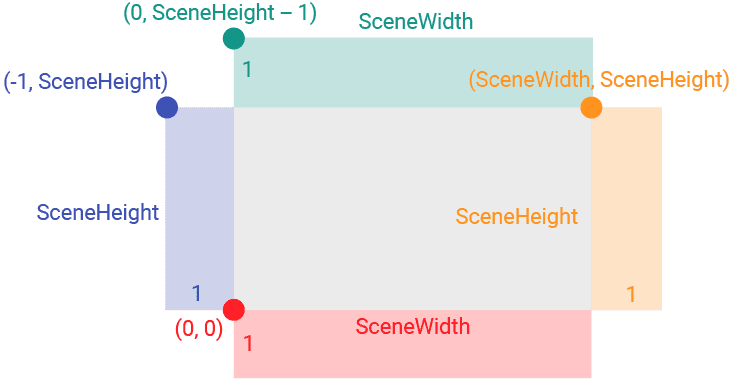
Let's implement this logic in the constructor:
Breakout/Wall.h
// ...
class Wall : public Entity {
public:
Wall(WallPosition Position, Scene& Scene)
: Entity{Scene}, Position{Position} {
// ...
float Height{Scene.GetHeight()};
float Width{Scene.GetWidth()};
float Thickness{1.0f * Scene.PIXELS_PER_METER};
using enum WallPosition;
if (Position == Top) {
Transform->SetPosition({0, -Thickness});
Collision->SetSize(Width, Thickness);
} else if (Position == Bottom) {
Transform->SetPosition({0, Height});
Collision->SetSize(Width, Thickness);
} else if (Position == Left) {
Transform->SetPosition({-Thickness, 0});
Collision->SetSize(Thickness, Height);
} else if (Position == Right) {
Transform->SetPosition({Width, 0});
Collision->SetSize(Thickness, Height);
}
}
// ...
};Given our walls have no visual appearance (ImageComponent), and are positioned outside the viewport anyway, there will be no visual changes to our program yet. However, we can now update our Ball to interact with them.
Making the Ball Bounce
Given our Ball and Wall entities have collision components, our engine is already detecting collisions in the CheckCollisions function of our base Scene class.
That function calls the virtual HandleCollision() function on our entities. Let's override it in our Ball class to implement the bouncing behavior.
Breakout/Ball.h
// ...
class Ball : public Entity {
public:
// ...
void HandleCollision(Entity& Other) override;
// ...
};We'll add a Breakout/src/Ball.cpp file to implement our bouncing reaction.
The logic here is two-fold:
- Resolve Penetration: We push the ball out of the wall so it isn't stuck inside. We determine the push direction by checking if the intersection rectangle is taller (horizontal collision) or wider (vertical collision).
- Bounce: We reflect the ball's velocity. If we hit a vertical surface (like a side wall), we flip the X velocity. If we hit a horizontal surface (like the top or bottom), we flip the Y velocity.
Breakout/src/Ball.cpp
#include "Breakout/Ball.h"
#include "Engine/Vec2.h"
void Ball::HandleCollision(Entity& Other) {
SDL_FRect Intersection;
Collision->GetCollisionRectangle(
*Other.GetComponent<CollisionComponent>(),
&Intersection
);
if (!(Physics && Transform)) return;
// Determine collision axis based on intersection shape
bool IsVertical{
Intersection.w > Intersection.h
};
// 1. Push ball out of the object to prevent sticking
Vec2 CurrentPos{Transform->GetPosition()};
if (IsVertical) {
if (Physics->GetVelocity().y < 0)
CurrentPos.y += Intersection.h;
else
CurrentPos.y -= Intersection.h;
} else {
if (Physics->GetVelocity().x > 0)
CurrentPos.x -= Intersection.w;
else
CurrentPos.x += Intersection.w;
}
Transform->SetPosition(CurrentPos);
// 2. Reflect velocity
Vec2 CurrentVel{Physics->GetVelocity()};
if (IsVertical) {
Physics->SetVelocity({
CurrentVel.x, -CurrentVel.y
});
} else {
Physics->SetVelocity({
-CurrentVel.x, CurrentVel.y
});
}
}Don't forget to update your project to ensure this new source file is included in the build. If you're using the CMakeLists.txt we provided, that might look like this:
CMakeLists.txt
# ...
add_executable(Breakout
"main.cpp"
# ...
"Breakout/src/BreakoutScene.cpp"
"Breakout/src/Ball.cpp"
)
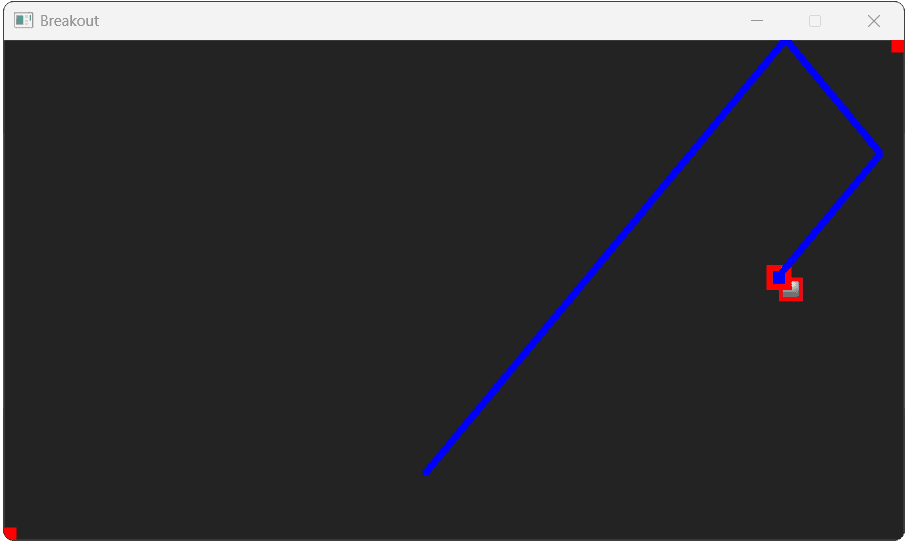
# ...With these changes, our ball should now be bouncing off the edges of our window:
Advanced: Collision Angles
Our previous implementation of bouncing updates the ball's velocity by simply inverting a velocity component based on the shape of the intersection. This works well for axis-aligned rectangles hitting perfectly flat sides.
However, when objects intersect at corners, this can sometimes produce unnatural results. A more robust, physically accurate approach involves using vector math to calculate the exact reflection based on the surface normal.
Normal Angle
To calculate a realistic bounce, we need to know the orientation of the surface we collided with. This is represented by the surface normal. The normal is a unit vector (length of 1) that points directly away from a surface, perpendicular to it.
The following illustration shows the normal angles at various points of a complex 3D surface:

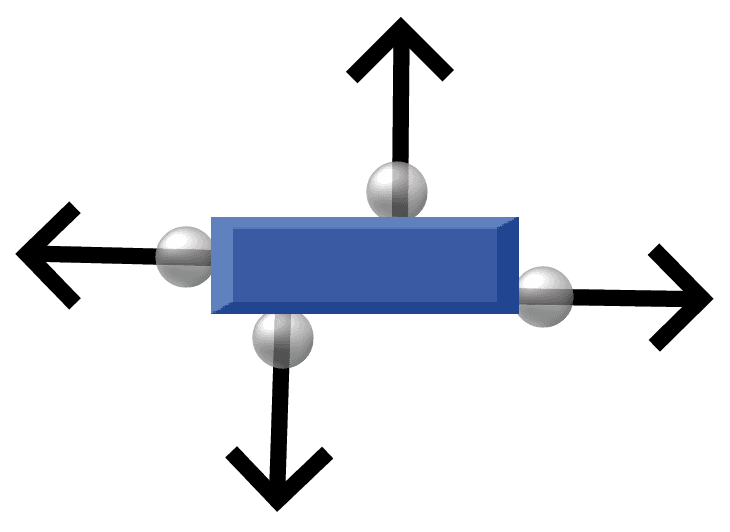
Since all our colliders are Axis-Aligned Bounding Boxes (AABBs), the normal at any collision point will be much simpler in our case. Any collision normal will essentially be one of the four cardinal directions: Up , Down , Left , or Right .
We can calculate this normal by looking at the relative position of the ball's center compared to the other object's center.
Dot Product
We can use the dot product to verify our collision logic. The dot product of two vectors tells us about the angle between them. If the dot product of the ball's velocity and the surface normal is negative, it means they are pointing in opposing directions - confirming the ball is moving into the surface and should bounce.
Improving Bouncing Logic
Let's update HandleCollision to use the vector reflection formula:
Where is the incoming velocity and is the surface normal.
We'll determine the normal based on the relative position of the centers.
Breakout/src/Ball.cpp
#include "Breakout/Ball.h"
#include "Engine/Vec2.h"
void Ball::HandleCollision(Entity& Other) {
TransformComponent* OtherTransform{
Other.GetComponent<TransformComponent>()
};
// Calculate relative position to determine the normal
Vec2 RelativePosition{
Transform->GetPosition() -
OtherTransform->GetPosition()
};
Vec2 Normal{
IsVertical ? Vec2{
0.0f,
(RelativePosition.y > 0) ? 1.0f : -1.0f
} : Vec2{
(RelativePosition.x > 0) ? 1.0f : -1.0f,
0.0f
}
};
Vec2 Velocity{Physics->GetVelocity()};
// Calculate dot product
float DotProduct{
Velocity.x * Normal.x +
Velocity.y * Normal.y
};
// Only bounce if moving towards the surface
if (DotProduct < 0) {
Physics->SetVelocity(
Velocity - (2 * DotProduct * Normal)
);
}
}This updated logic provides a more robust implementation of bouncing that will handle not just walls, but also the paddle and bricks we will add in future lessons.
Complete Code
Complete versions of the files we updated in this section are available below:
Files
Summary
We've now made our game feel like an enclosed arena by adding walls and implementing bouncing physics.
We created a Wall class, placed four instances at the screen's edges, and then coded the collision logic within the Ball's HandleCollision() function.
Here's a summary of what we've accomplished:
- We created a new
Wallentity to define the play area boundaries. - We added logic to our
Ballto react to collisions with other entities. - We reviewed how to implement a simple bounce by flipping velocity components.
- We implemented an advanced bounce using the surface normal and dot product for more accurate results.
Breakout: The Player Paddle
We'll build the player's paddle, hook it up to keyboard controls, and keep it from moving off-screen.